The post From TikTok Inspiration to Multi-Unit Success: How Hailie Marie Scales with Smart Tech appeared first on PriceLabs .
]]>
The Spark: A Quick Start in Vacation Rentals
“I saw a TikTok video in 2022 and it sparked my interest!”
That’s how Hailie describes her entry into vacation rentals. From that initial curiosity, she dove into the world of arbitrage, focusing primarily on multi-unit apartment deals. Her rapid ascent highlights the potential for anyone with drive and a strategic mindset to build a significant STR portfolio.
The Strategy: Team, Tech, and Guest Experience
When it comes to scaling her business, Hailie’s philosophy is clear: automation, delegation, and tech. She firmly believes that the “combination of team and tech” has been the biggest driver of her success.
Her approach to guest experience is equally strategic.
“I want a 5-star guest experience no matter who the guest communicates with on my team, and no matter which property they stay at.”
Hailie emphasizes the importance of leadership and investing in her team, which in turn empowers them to deliver consistently high-quality service. Looking ahead, her goal is to continue scaling her arbitrage deals as long as the numbers make sense, with future plans to reinvest profits into purchasing or even developing STR properties.
The Challenge: The Guessing Game of Manual Pricing
Before discovering the power of intelligent tools, managing pricing and bookings was a solo act. “I was self-managing… (do not recommend haha),” she admits. The core challenge was clear:
“There are so many variables, and each property, each market is so different. I was very confused on how to properly price my properties to reach the highest occupancy at the highest rate.”
This manual guesswork was a significant drain on time and revenue potential.
The Solution: Data-Driven Automation with PriceLabs
Enter PriceLabs. For Hailie, the most helpful aspect of the tool is “The amount of data and resources provided.” She explains,
“It makes understanding the numbers a lot easier and helps automate a big time constraint for me.”
This automation liberated her from tedious manual pricing adjustments, allowing her, as an Airbnb expert, to focus on strategic growth.
The Results: More Occupancy, Higher Profits, and Time to Scale
The impact of integrating PriceLabs was immediate and continues to compound. “There has been an increase monthly since signing up over 2 and a half years ago,” she confirms. The concrete results include:
“Increased Occupancy, increased profits, and more time to spend scaling my business rather than spending hours messing around with pricing, just guessing!”
This tangible outcome highlights how smart tech directly translates into improved business performance and greater freedom for the host.
Advice for Fellow Hosts: Dynamic Pricing is Non-Negotiable
For those looking to succeed in today’s STR market, our partner and an Airbnb expert offers straightforward advice: “A lot of people struggle in the hospitality business not because they have a bad property, but because they do not know how to run the property correctly. There are strategies behind pricing and you cannot just guess.”
She concludes with a powerful statement:
“I think dynamic pricing is now a non-negotiable to compete in any market. It used to be optional and you could still have success, but now I feel it is required to survive in any market.“
Ready to transform your STR business with smart pricing? Follow our partner and Airbnb expert’s journey and gain insights into optimizing your properties at @hailiemaarie.
The post From TikTok Inspiration to Multi-Unit Success: How Hailie Marie Scales with Smart Tech appeared first on PriceLabs .
]]>The post List Property on Expedia: A Guide for Hosts appeared first on PriceLabs .
]]>In this guide, we will
- Walk you through how to list a property on Expedia step by step, what you need before you get started, and how to make the most of your listing to maximize returns.
- Include a checklist that you can use to tick the boxes when first adding your STR to the website.
- Show you how PriceLabs can help you reach optimal ROI.
Download Our Free Checklist To List Your Property On Expedia Effectively!
A ready-to-use checklist that will help you assign tasks, track responsibilities, and keep operations consistent across every stay.
Download It NowWhy Should You List Your Property on Expedia
Listing your property on Expedia comes with important advantages that allow you to boost your vacation rental marketing strategy and enhance income.
Key Benefits of Listing on Expedia
- Global Exposure: Reach millions of potential guests worldwide. In 2024, 383.9 million rooms were booked on Expedia.
- Multi-Platform Visibility: Get seen on Expedia’s partner websites, including Vrbo, Orbitz, Travelocity, and others.
Check out Vrbo listing requirements.
- Diverse Guest Personas: Attract a broad audience, including leisure and business travelers.
- Reliable Payments: Have your payments handled by Expedia, reducing friction.
- More Income: Maximize your vacation rental revenue with a higher occupancy rate and dynamic pricing (more on this shortly).
Requirements Before Listing Your Property on Expedia
Before you start the listing process, make sure that you have the following documentation and information ready:

- Business or Personal Information: Legal name, contact info, and tax details.
- Property Details: Property type, size, number of bedrooms and bathrooms, amenities, and house rules.
- High-Quality Photos: High-resolution, well-lit professional photos of the outside and the inside of the property, showcasing the house.
- Pricing and Availability Calendar: Manual or connected with a property management system (PMS) or channel manager.
- Cancellation and Guest Policies: Flexible or strict vacation rental cancellation policy and guest rules in line with your comfort and strategy.
- Banking Information: For secure payouts.
Maximize Your Vacation Rental Return with Dynamic Pricing!
Boost occupancy & optimize revenue with PriceLabs’ Dynamic Pricing & Revenue Management tool. Implement a smart pricing strategy based on market conditions, seasonality & competition for excellent ROI.
Get Started NowHow to List Property on Expedia in 6 Steps
Step 1: Create an Account on Expedia Group Partner Central
Go to Expedia Group Partner Central. Choose your property type (Private Residence) and complete the registration process.
Step 2: Enter Your Property Info
Fill in the property name, address, and type. Add key amenities such as Wi-Fi, kitchen, swimming pool, and others.
Step 3: Upload Photos
Use at least 5 high-quality photos. Include images of the exterior, kitchen, bedrooms, bathrooms, and living areas. Highlight amenities in the photos.
Follow the same rules as for Airbnb photos.
Step 4: Set Rates and Availability
Add daily rates manually or connect your Expedia listing to your PMS or channel manager for automatic pricing updates. Use PriceLabs to automate optimal rates based on demand and seasonality as well as length of stay and day of the week.
Step 5: Add House Rules and Policies
Explain check-in and check-out times, smoking and pet policies, and cancellation terms. Use clear language to avoid confusion. Adjust your policies to be flexible enough to attract more bookings but also strict enough to be comfortable with them.
Step 6: Review Your Listing and Publish
Double-check all details. Publish your listing when ready. Expedia will review your listing before it goes live.
How Do I List My Property on Expedia for Maximum ROI?
1. Write an Optimized Headline and Description
Conduct keyword research to see what’s trending in the area. Use clear and engaging language. Strategically place keywords throughout. Take advantage of bullet points and emojis (within reason).
Get inspired by the best Airbnb titles. The rules are similar.
You can use PriceLabs STRings to generate good and effective descriptions for your Airbnb property.

2. Use Dynamic Pricing
Automate nightly rate adjustments with PriceLabs to reflect local demand, seasonality trends, and major events in the area. Set up pricing rules based on lead time, length of stay, and day of the week. Achieve the right balance between occupancy and price to maximize revenue and return.

Note that you can easily connect PriceLabs to your listing on Expedia via a PMS, such as Hostaway, to enjoy the benefits of dynamic pricing.
3. Keep Availability Up-to-Date
Avoid double bookings and missed opportunities when listing your vacation rental on multiple platforms. Sync your booking calendars across different websites.
4. Highlight Unique Selling Points
In your listing on Expedia, emphasize what makes your property special and different from comps in the area. Focus on things such as a private garden, city view, or free parking.
5. Encourage Guest Reviews
Once you start getting reservations, communicate effectively with guests and be there to answer their questions. Follow up with them upon check-out to leave reviews, which helps boost credibility, enhance ranking, and get more bookings.
Making More Money by Listing Your Property on Expedia
This is how to list a property on Expedia in 6 easy steps. Adding your vacation rental to Expedia doesn’t just enhance visibility; it opens the door to smarter hosting. By combining Expedia’s global reach with PriceLabs’ automated pricing tools, you can attract the right guests at the right rate to maximize your revenue with less manual effort.
Frequently Asked Questions
Can I List My Property on Expedia Without a PMS or Channel Manager?
Yes, you can list your property on Expedia directly, without a PMS or channel manager, through the Expedia Partner Central platform. However, using a PMS helps you sync your calendar, eliminate double bookings, and – most importantly – apply smart pricing.
How Long Does It Take for a Listing to Be Approved on Expedia?
Once submitted, listings are typically reviewed within 24-48 hours. Expedia might reach out for additional verification before your listing goes live.
How Much Are Expedia Fees for Hosts?
Expedia usually charges a commission of 15-25% per booking, depending on location and property type. You can see the exact rate during setup.
The post List Property on Expedia: A Guide for Hosts appeared first on PriceLabs .
]]>The post How to Choose the Best Pricing Tool for Airbnb: Host’s 2025 Guide appeared first on PriceLabs .
]]>That’s where dynamic pricing tools come in. These platforms utilize data and automation to help you adjust rates in real-time, ensuring your property remains competitive, your occupancy rates increase, and your income grows, all while saving you hours each week.
But not every pricing tool is created equal. For hosts managing one to five listings, the right solution should offer more than just automation; it should give you control, reliable data, and a clear path to higher earnings.
In this guide, you’ll discover what makes PriceLabs the best dynamic pricing tool for Airbnb, which features matter most, and how PriceLabs stands out as the preferred choice for successful hosts.
Audit Multiple Tools Before Finalizing One Revenue Management Software For Your Property!
Choosing the right tool is the most important step of your dynamic pricing journey. Audit multiple tools and compare features before finalising one.
Download The Checklist NOW!Why Every Airbnb Host Needs a Dynamic Pricing Tool
Before you dive into the features and comparisons, it’s worth asking—why bother with dynamic pricing at all? Understanding the “why” behind these tools makes it easier to see just how much you could be leaving on the table.
Manual pricing is a challenging game for Airbnb hosts, especially if you’re managing multiple listings or juggling a busy schedule. Market trends shift quickly: local events pop up, demand spikes, competitors tweak their rates overnight, and seasons change faster than you can update your calendar. Without up-to-date data, you’re forced to rely on gut feelings or outdated pricing strategies, risking both overpricing (which means fewer bookings) and underpricing (leaving revenue on the table).
Dynamic pricing tools change the game. Instead of guesswork, these tools use real-time data—like booking trends, market occupancy, local events, and competitor prices—to set and update your nightly rates automatically. This means your prices always reflect the true market value, day after day.
For Airbnb hosts, the benefits are immediate and measurable:
- Higher Occupancy: Automated rate adjustments help fill your calendar, even during slow periods.
- Increased Revenue: By capturing peak demand and avoiding missed opportunities for special events, you can earn up to 10–40% more* compared to static pricing.
- Time Savings: No more daily spreadsheet updates or late-night pricing decisions.
- Peace of Mind: Know your property is always competitive, even when you’re not watching.

What Makes a Dynamic Pricing Tool the “Best” for Airbnb Hosts?
With dozens of pricing tools promising more bookings and higher revenue, it can be tough to know what really matters. The “best” dynamic pricing tool isn’t just the one with the fanciest dashboard—it’s the one that fits your goals, style, and the realities of managing 1–5 listings.

When comparing dynamic pricing tools, keep these essential criteria in mind. The best tool should give you a blend of automation and control—empowering you to make data-driven decisions, without locking you into a “one size fits all” approach.
Below, let’s break down each must-have feature to help you separate real value from the marketing fluff.
1. Accuracy & Data Sources:
Dynamic pricing lives and dies by the quality of its data. A tool that updates rates using stale or limited information won’t help you compete. Look for solutions that tap into real-time booking trends, local demand signals, event calendars, and competitive listings—not just generic, city-wide averages.
PriceLabs, for example, combines Market Dashboards and Neighborhood Data to surface insights right down to your street or building.
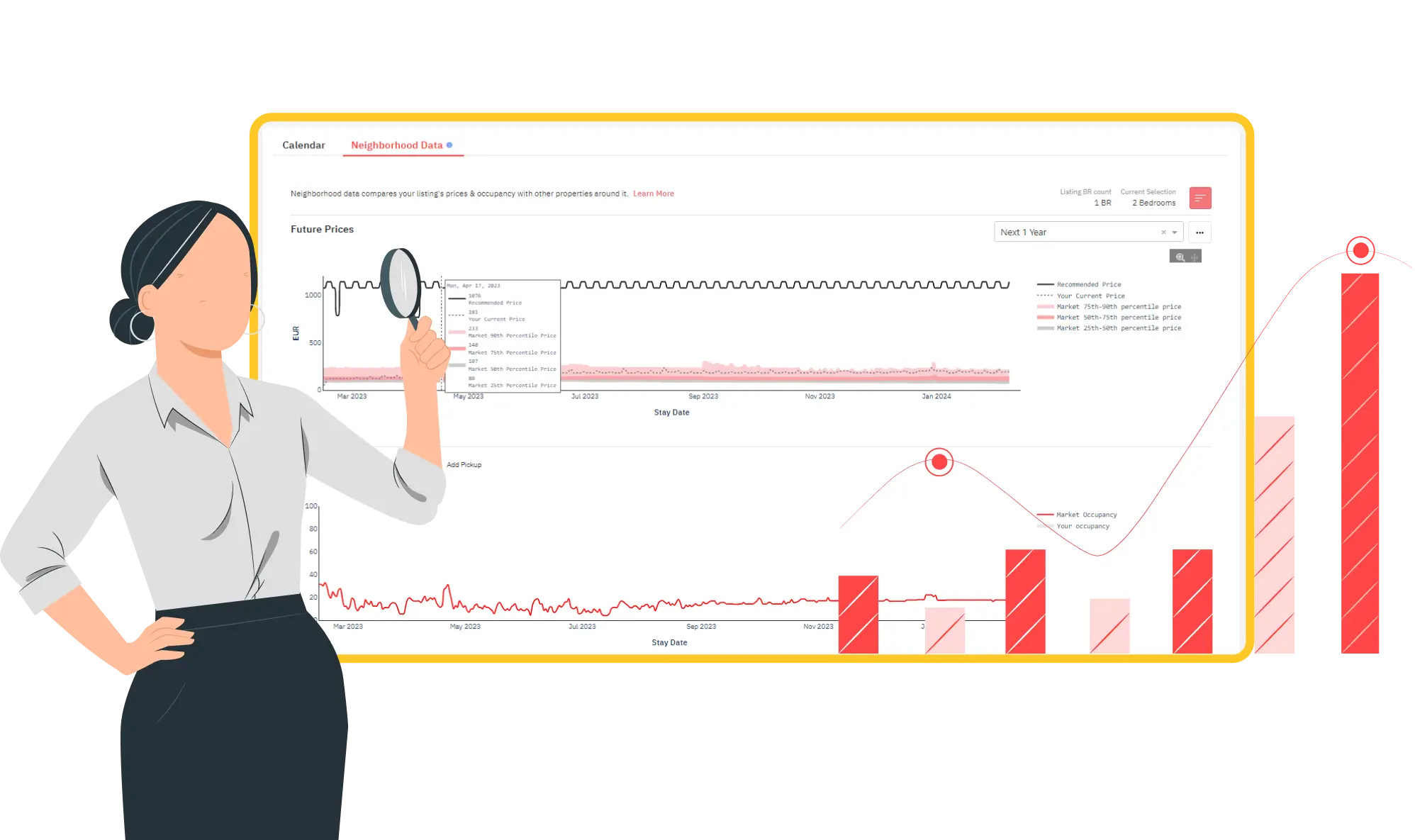
Stay Ahead of the Market and Find the Right Amenities that Your Potential Guests Want Using PriceLabs Market Dashboard.
Use PriceLabs Market Dashboard and Neighborhood Data to track competitor pricing and demand shifts and analyze past performance to set a strong pricing strategy for your property.
Create your Market Dashboard Now2. Customization & Control:
Every listing is unique—so your pricing strategy should be, too. The best dynamic pricing tools allow you to set your own rules, minimum stays, pricing floors/ceilings, and even customize rates for special dates or seasons. Whether you prefer full automation or hands-on tweaking, flexibility is essential.
With PriceLabs, you get powerful rule engines and “Comp Sets” that let you fine-tune pricing for each property.
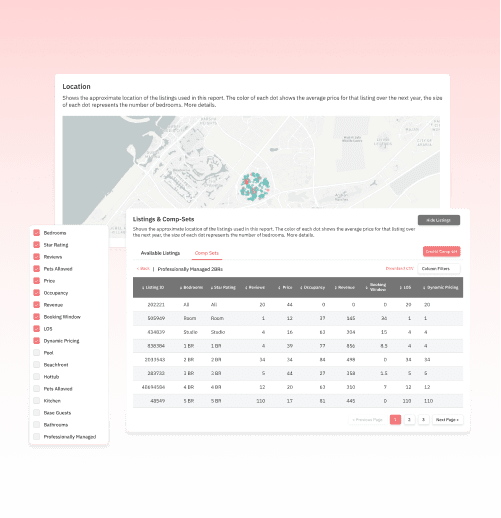
3. Ease of Use & Integrations:
If a tool takes hours to set up—or doesn’t sync smoothly with Airbnb and your property management systems—it quickly becomes more trouble than it’s worth. Prioritize solutions that make onboarding simple, offer intuitive dashboards, and integrate seamlessly with the platforms you already use.
PriceLabs is known for its quick Airbnb connection and user-friendly interface.

4. Transparent Pricing & ROI:
Be cautious of tools that hide extra fees or only reveal the actual cost after signing up. As a host, you need to understand your expenses up front, with no surprises. Look for pricing models that are clear, predictable, and scale fairly with your business.
PriceLabs charges a flat, per-listing fee with no hidden costs—making it easy to track your ROI from day one.
Maximize Your Vacation Rental Return with Dynamic Pricing and Understand Your Portfolio Performance With Portfolio Analytics!
Boost occupancy & optimize revenue with PriceLabs’ Dynamic Pricing & Revenue Management tool. Implement a smart pricing strategy based on market conditions, seasonality & competition for excellent ROI.
Start Your FREE Trial Now5. Support & Community
Responsive support isn’t a bonus—it’s a necessity, especially when you’re starting. Whether you prefer live chat, help articles, or hands-on onboarding, choose a platform known for fast, reliable support and an active community of fellow hosts.
PriceLabs offers live onboarding, an extensive help center, and real people to help troubleshoot when you need it most.

When comparing tools, demo each one with your real Airbnb data. This lets you see how features and pricing will work for your specific listings—before you commit.
How to Compare the Best Airbnb Pricing Tools
Choosing a dynamic pricing tool isn’t just about picking the first name you find on Google. To find the best fit for your Airbnb business, you need to go beyond the sales pitches and look for proof—both in features and in results.

Before committing, review the tool’s feature pages, browse host reviews, and take advantage of free trials or demos. This process helps you experience how the platform works with your listings—and whether it delivers on its promises.
Some tools offer “set it and forget it” simplicity but lack deeper customization or local intelligence. Others provide advanced analytics but are overwhelmed by complexity or hidden costs. As you compare, look for solutions that:
- Empower you with control and automation, not just one or the other
- Back up their claims with real host case studies (not just generic testimonials) {Look at our case studies}
- Offer transparent, honest pricing with no strings attached
PriceLabs is built specifically to help individual hosts succeed, with a proven blend of automation, transparency, and hands-on support—making it a natural fit for anyone serious about maximizing their Airbnb income.
Step-by-Step: How to Set Up Dynamic Pricing With PriceLabs
You don’t need to be a tech expert to start earning more with PriceLabs. In just a few simple steps, you can connect your Airbnb listing, customize your pricing strategy, and watch your calendar fill up—no spreadsheets, no guesswork.

Getting Started: A Quick Walkthrough
- Sign Up for PriceLabs: Visit PriceLabs and create your free account. No credit card required to start.
- Connect Your Airbnb Account: Authorize PriceLabs to access your Airbnb listing. The process is secure, quick, and takes less than two minutes.
- Import Your Listings: Once connected, PriceLabs automatically pulls in your properties and displays them on your dashboard.
- Set Your Base Price: Use PriceLabs’ guidance or set your own base price. This anchors your pricing strategy, and you can update it anytime.
- Customize Your Pricing Rules: Adjust minimum and maximum rates, minimum stays, and create custom rules for weekends, events, seasons, or last-minute bookings.
- Review the Recommendations: PriceLabs generates daily pricing suggestions using real-time market data and your custom rules—review and adjust as needed.
- Sync & Go Live: Once you’re happy, turn on sync. PriceLabs will automatically update your Airbnb rates every day.
Pro-Tip: Don’t set it and forget it! Log in every few weeks to check performance, adjust your base price if the market shifts, and explore new features like Comp Sets or Neighborhood Data for extra competitive edge.
PriceLabs’ setup is built for speed and confidence. Even if you’re new to dynamic pricing, the intuitive dashboard and guided onboarding make it easy to start pricing smarter—right away.
Final Thoughts on the Best Pricing Tool for Airbnb
Choosing the best pricing tool for Airbnb isn’t just about finding the latest feature or trend—it’s about gaining the control, insight, and automation you need to run a more profitable, less stressful hosting business. With dynamic pricing, you stop leaving money on the table and start capturing the full value of your listing, every night.
Not all pricing tools are created equal. The best solution empowers you with local data, flexible controls, transparent pricing, and support that helps you grow. That’s why thousands of hosts trust PriceLabs—not just for the technology, but for the results and peace of mind it brings.
Ready to see the difference for yourself? Try PriceLabs, set your strategy in minutes, and unlock a smarter, more rewarding way to manage your Airbnb pricing.
Frequently Asked Questions About the Best Pricing Tool for Airbnb
Q1: How does dynamic pricing work for Airbnb?
Dynamic pricing tools analyze real-time market data, seasonal trends, local events, and competitor rates to adjust your nightly prices automatically. This helps maximize bookings and revenue by ensuring your property is always priced competitively.
Q2: Can I set minimum and maximum prices with a dynamic pricing tool?
Yes! The best Airbnb pricing tools—including PriceLabs—let you set your own minimum and maximum rates, control rules for special dates, and adjust strategies for weekends, events, or last-minute bookings. You’re always in charge of your price limits.
Q3: Is it safe to let a tool set my Airbnb prices automatically?
Absolutely. Top dynamic pricing platforms update prices using accurate, transparent data and proven algorithms. Plus, you can review, tweak, or override any recommendations—so you keep complete control over your listings and never lose sight of your business goals.
Q4: What if I manage more than one listing?
Dynamic pricing tools, such as PriceLabs, are designed for both single hosts and small portfolios. You can manage multiple listings in one dashboard, apply custom rules per property, and save hours every week by automating price updates across your entire portfolio.
Q5: How long does it take to see results with dynamic pricing?
Most hosts notice higher occupancy and better earnings within the first month. Results depend on your market and listing quality, but automated pricing typically delivers quick wins—especially if you regularly review and optimize your base price and settings.
The post How to Choose the Best Pricing Tool for Airbnb: Host’s 2025 Guide appeared first on PriceLabs .
]]>The post How Storytelling Transforms Short-Term Rental Marketing into Guest Bookings? appeared first on PriceLabs .
]]>Why Storytelling Matters in Short-Term Rental Marketing?
Storytelling isn’t just for novels or movies—it’s one of the most powerful tools in modern marketing. For vacation rental hosts, it’s the secret ingredient that transforms a list of amenities into a memorable experience.

- Building Trust and Aspiration: A great story invites guests to imagine themselves in your space. Instead of seeing your listing as just another rental, they picture mornings with coffee on your sunlit balcony, or evenings spent by the fire. This emotional connection not only boosts engagement but often drives guests to book faster and at higher rates.
- Standing Out in a Crowded Market: With thousands of similar listings on Airbnb and Vrbo, a compelling narrative is your chance to stand out. Guests don’t remember listings—they remember stories. And the properties that stick in their minds are the ones that feel personal, inviting, and real.
Maximize Your Vacation Rental Return with Dynamic Pricing and Understand Your Portfolio Performance With Portfolio Analytics!
Boost occupancy & optimize revenue with PriceLabs’ Dynamic Pricing & Revenue Management tool. Implement a smart pricing strategy based on market conditions, seasonality & competition for excellent ROI.
Start Your FREE Trial NowThe Foundations of Storytelling for Hosts
Before you can start using storytelling in your short-term rental marketing, it’s essential to lay a strong foundation. This involves identifying your property’s unique aspects, understanding your ideal guest, and shifting your focus from listing features to sharing experiences.
1. Identify Your Vacation Rental’s Unique Narrative
Every property has a story—sometimes you just need to dig a little to find it.
Is your home a restored heritage villa, a modern apartment with city views, or a cozy mountain cabin passed down through generations? Maybe your journey as a host is itself compelling—did you start hosting to share your love of surfing, or to preserve a family retreat?
Write down three things that set your property apart: history, location, or even the quirks you love. Example: “Our lakeside cottage was built in the 1950s by my grandparents, and every summer since, our family has gathered here to celebrate togetherness and sunsets.”
2. Know Your Target Guest
Not all stories will resonate with everyone. Are you aiming to attract families, couples, solo travelers, or digital nomads? Knowing your audience helps tailor your story so it feels personal and relevant.
Example Persona:
- “Imagine waking up here as a remote worker—coffee on the balcony, strong WiFi for video calls, and a sunset swim to end your day
- “For families, our backyard treehouse and s’mores-ready firepit make for unforgettable evenings.”
3. Highlight Experiences, Not Just Features
The features of your rental (bedrooms, WiFi, pool) matter—but what truly draws guests in are the experiences those features enable. Rather than simply stating “3 bedrooms, fast WiFi, and a grill,” paint a picture:
“Gather your loved ones for a barbecue on the deck while the kids play in the garden. Share stories around the firepit after a day exploring nearby trails.”
This approach helps guests envision themselves making memories at your property, not just occupying space.
Pro-Tip: By shifting your focus from things to experiences, you unlock the emotional appeal that makes your listing unforgettable.
Practical Ways to Use Storytelling in Your Short-Term Rental Marketing
Storytelling can and should be embedded into every guest touchpoint, both online and offline. Here’s how to apply it across your entire marketing strategy:
1. Listing Descriptions: Make Every Word Count
Your listing is your first (and sometimes only) chance to make an impression. Storytelling transforms generic descriptions into vivid invitations.
- Start with a scene: Open with a “moment” rather than a list.
Example: “Step into a sunlit kitchen where you can sip fresh coffee as the city wakes up outside your window.” - Highlight transformation: Describe how guests might feel before and after their stay.
Example: “Arrive as strangers—leave as friends, with memories of bonfires, laughter, and starlit evenings.” - Weave in your property’s personality: Is it quirky, modern, tranquil, or historic? Let that flavor show in your language.
- Connect amenities to experiences: Example: “Enjoy a movie night in our cozy living room with plush throws and an old-school popcorn maker.”
Pro-Tip: Use the “Show, Don’t Tell” approach. Instead of saying “romantic getaway,” describe the candlelit dinners on the terrace or the secluded garden bench perfect for two.
STRings: Airbnb Description Generator is a powerful tool that employs Artificial Intelligence to generate compelling, relevant, and best Airbnb descriptions for your listing within seconds.
2. Visual Storytelling: Photos, Videos & Captions
A single Airbnb photo can tell an entire story, but only if you curate intentionally.

- Sequence your photos: Arrange images to mirror the guest journey: arrival, first impressions, communal spaces, cozy corners, outdoor adventures.
- Add captions: Brief, sensory captions help guests imagine moments.
Example: “Sink into the hammock with a good book as the breeze rustles the palms.” - Show experiences in action: Feature guests (with permission), families at dinner, kids playing, a dog curled by the fireplace, a picnic set up in the garden.
- Leverage short-form video: Create 30-second “day-in-the-life” reels or room tours, highlighting moments (e.g., “Morning coffee with sunrise views”).
- Use user-generated content: Repost guests’ stories, reviews, or photos on your listing and social channels.
Pro-Tip: Photos of people enjoying your space create an instant emotional hook—far more than empty rooms.
3. Social Media: Build Your Property’s Ongoing Narrative

Social media isn’t just for advertising availability; it’s a place to cultivate your brand and community.
- Tell micro-stories: Share snippets—“The first snow of the season at our mountain cabin,” or “The story behind our hand-painted mural.
- Highlight local stories: Post about nearby festivals, local legends, or must-visit cafés.
- Run guest spotlights: Feature stories or testimonials from past guests (“Meet the Smiths, who celebrated their anniversary here…”).
- Behind-the-scenes: Show your hosting process, preparations, or little upgrades—humanizing the brand.
Pro-Tip: Don’t just post photos—use Instagram Stories, Facebook Live, or TikTok to narrate your day, answer questions, or walk viewers through the property in real-time.
4. Direct Booking Website & Email: Reinforce Your Story Everywhere
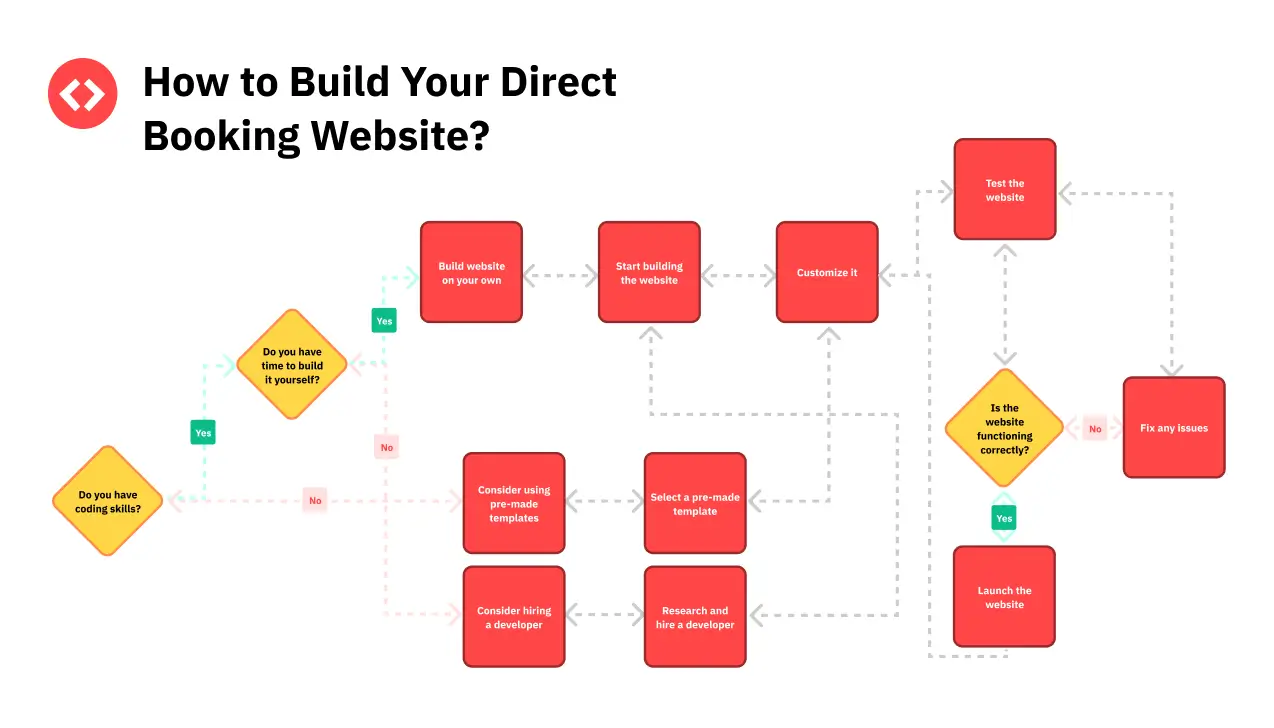
Your direct booking website and guest emails offer more room to tell your story in depth and maintain consistency.
- “Meet the Host” pages: Share your journey, values, and why you started hosting.
- Story-driven blogs: Write about how your home came to be, renovation tales, or memorable guest experiences (with consent).
- Email nurture sequences: Welcome emails can include a brief personal story, a favorite local memory, or a tip tied to your property’s theme (e.g., “Our favorite sunrise spot is just a five-minute walk away”).
- Brand voice: Carry your unique tone into every guest interaction—confirmation emails, FAQs, guidebooks.
Pro-Tip: Add downloadable guides, such as “Our Family’s Favorite Hiking Trails,” to further anchor your story in the local context.
5. Offline Touchpoints: Make Storytelling Part of the Guest Experience
- Welcome notes & guidebooks: Open with a story or anecdote—why you love the home, a fun fact about the area, or a “hidden gem” you discovered.
- In-property signage: Frame instructions or tips with personality (“This old oak tree is where our kids built their first treehouse!”).
- Guestbooks: Encourage guests to share their own stories, which can be highlighted (with permission) in future marketing.
Pro-Tip: Storytelling continues during and after the stay. Guests who feel connected to your property’s story are more likely to leave heartfelt reviews and return for future visits.
Every part of your marketing—from the listing and photos to emails and in-person touches—can be infused with story. Start small, be authentic, and build layer by layer for a brand guests will remember.
Storytelling Across the Guest Journey
Great storytelling doesn’t end with your listing—it can be woven through every step of the guest’s experience, creating deeper connections and higher satisfaction. Here’s how to embed your narrative before, during, and after each booking:
Pre-Booking: Attraction and Inspiration
- Listings, ads, and social media: Make your story the reason guests choose your property. Instead of “Book now!”—inspire them with “Create your own lakehouse memories,” or “Experience the town’s best sunrise from our balcony.”
- Personal responses to inquiries: When replying to guest questions, use the opportunity to reinforce your narrative. For example, if someone asks about local restaurants, share a personal favorite or a story about a memorable meal you had nearby.
Booking Stage: Personalized Confirmation
- Confirmation emails: Don’t just send a receipt—send a welcome message rooted in your story. Example: “We’re thrilled you chose our mountain retreat, where our family has gathered for winter holidays for decades. You’ll find hot cocoa in the kitchen—a family tradition we hope you’ll enjoy.”
- Share anticipation: Build excitement with a preview of what’s to come, such as a story about the area, a favorite trail, or a tradition guests can experience during their stay.
During the Stay: Immersive Touchpoints
- Welcome letters and house manuals: Open with a warm note about the property’s history, your hosting philosophy, or a local legend. Example: “This fireplace was built with stones from the original cottage. On cold evenings, we love to curl up here with a book—please help yourself to our little library.”
- Local guides and tips: Frame recommendations as stories: “This bakery has been family-run for three generations—try the almond croissants, just like we do every Sunday.”
- Small surprises: If you provide a treat or a special amenity, tie it back to your story (e.g., “The homemade jam in your welcome basket comes from the apple trees in our backyard.”)
Post-Stay: Encouraging Connection and Loyalty
- Thank-you emails: Reference their unique stay and invite them to return (“We hope your family enjoyed the board game collection—it’s brought us many rainy-day laughs!”)
- Review requests: Ask guests to “share their story” in their review, encouraging richer and more detailed feedback.
- Stay-in-touch campaigns: Send occasional updates: “This spring, we added a hammock by the lake—can’t wait for you to try it on your next visit!”
Final Thoughts: Turning Your Property into a Guest Magnet
In a world where travelers have endless choices, the difference between a forgettable listing and a guest magnet often comes down to one thing: story. By weaving storytelling into every aspect of your short-term rental marketing—from your online listings and social media to the welcome notes your guests find on arrival—you create a property that feels alive, memorable, and inviting.
Storytelling isn’t about inventing tales or making empty promises. It’s about revealing the real experiences, values, and personal touches that make your space special. Start small: rewrite a listing intro, add a heartfelt caption, or share a favorite local tip. Over time, these authentic stories build a brand guests want to be a part of—and return to.
So, embrace your property’s narrative. Share it boldly, consistently, and across every channel. In doing so, you’ll transform not only how guests see your space, but also how you see your own journey as a host.
FAQs on Storytelling & Short-Term Rental Marketing
1. How can I market my vacation rental property effectively?
The most effective short-term rental marketing combines compelling storytelling with professional photos, optimized listings on platforms like Airbnb and Vrbo, and consistent branding across social media, email, and direct booking websites. Focus on sharing your property’s unique story and guest experiences—not just amenities—to stand out and attract bookings.
2. Where should I share my vacation rental’s story?
Share your story everywhere guests interact with your business: listing descriptions (Airbnb, Vrbo, etc.), photos and captions, social media posts, your direct website, pre-arrival emails, in-house welcome materials, and even in guest review requests. Consistent storytelling across these channels creates a memorable and cohesive brand.
3. What are some easy storytelling ideas for my short-term rental marketing?
Start with these quick wins:
- Open your listing with a guest-centered moment.
- Add captions to photos that evoke emotion or describe experiences.
- Include a personal welcome note.
- Share a favorite local legend or tip in your guidebook.
- Highlight guest stories in your marketing (with permission).
4. Can I market my vacation rental home on multiple sites?
Yes! You can (and should) market your vacation rental on platforms like Airbnb, Vrbo, Booking.com, and your own direct site. Just ensure your core story and brand remain consistent, even as you adapt your narrative and photos to fit each platform’s style and requirements.
5. How does storytelling increase bookings for my vacation rental?
Storytelling creates an emotional connection that makes your property memorable and desirable. According to marketing research, stories are up to 22 times more memorable than facts alone. When guests can picture themselves making memories at your property, they’re more likely to book—and more likely to return.
The post How Storytelling Transforms Short-Term Rental Marketing into Guest Bookings? appeared first on PriceLabs .
]]>The post Airbnb Analytics Made Easy: How to Monitor Your STR Portfolio Performance appeared first on PriceLabs .
]]>Portfolio analytics solves this by giving you a unified view of your Airbnb business. Instead of zooming in on one listing at a time, you can track occupancy, revenue, and performance across your entire portfolio. This lets you spot what’s working, fix what’s not, and grow with confidence.
In this article, we’ll walk you through PriceLabs’ Portfolio Analytics tool—what it shows, how to use it, and why it matters. Whether you’re managing two listings or twenty, you’ll learn how to analyze your data, identify trends, and make smarter decisions that improve your bottom line.
Portfolio Analytics is FREE with your PriceLabs Account!
Create a FREE account with PriceLabs now and implement a smart pricing strategy based on market conditions, seasonality & competition for excellent ROI. And get a FREE comprehensive reporting system for your entire portfolio.
Create Your FREE Account Now!What Is Airbnb Analytics and Why Should You Care?
Airbnb analytics (also known as short-term rental analytics or vacation rental data analysis) helps you understand how your listing is performing based on real data, not guesswork. Whether you’re managing one property or a growing portfolio, having the right insights lets you make smarter, more profitable decisions.
Instead of relying on instincts alone, Airbnb analytics tools show you:
- How far in advance guests are booking (your booking window or lead time)
- How many nights are getting booked and at what nightly rate
- Whether you’re getting bookings faster or slower than you were last year
- How your prices compare to other similar listings nearby
- Which listings or booking channels are bringing in the most revenue
By regularly tracking this kind of data, you get a clear view of your current performance and where you’re headed.
Why Airbnb Analytics at the Portfolio Level Matters
Most hosts start by optimizing one listing at a time. But once you manage more than a couple of properties, you need to stop thinking like a host and start thinking like a business owner.
1. Tracking Overall Performance Beyond Individual Listings
Airbnb’s native dashboard offers decent insights for each listing, but it doesn’t show how your entire portfolio is performing. Without that, you can’t:
- Compare occupancy across cities or property types
- Identify which listings are driving most of your revenue
- Spot gaps or patterns across multiple units
Portfolio analytics gives you exactly that. It shows trends in your occupancy, ADR (average daily rate), RevPAR, and more—across all listings in one place.
2. Spotting Trends, Not Just Snapshots
When you look at one listing in isolation, it’s easy to misread short-term fluctuations. Portfolio-level insights help you:
- Track performance over time
- Understand seasonal patterns across regions
- Identify underperformers before they drag down revenue
Instead of reacting to one bad week, you’re empowered to make data-backed decisions that improve your entire business.
Key Airbnb Analytics Metrics Every Host Should Know
When it comes to understanding your short-term rental performance, a few key numbers matter most. These are called KPIs (Key Performance Indicators), and PriceLabs makes them easy to track.
Here are the most important ones:
- Occupancy Rate – How many nights are booked vs. available
- ADR (Average Daily Rate) – Your average nightly price
- RevPAR (Revenue Per Available Room) – A mix of occupancy and ADR
- Booking Window / Lead Time – How far in advance guests are booking
- Length of Stay (LOS) – Average number of nights per booking
These Airbnb analytics help you see what’s working and where you might need to make changes.
Maximize Your Vacation Rental Return with Dynamic Pricing and Understand Your Portfolio Performance With Portfolio Analytics!
Boost occupancy & optimize revenue with PriceLabs’ Dynamic Pricing & Revenue Management tool. Implement a smart pricing strategy based on market conditions, seasonality & competition for excellent ROI.
Start Your FREE Trial NowInside the Portfolio Analytics Dashboard
The Portfolio Analytics tool from PriceLabs gives you two key views:
1. KPIs & Historic Reports
This part of the dashboard is all about past and recent performance. You can compare:
- Bookings made in the last 30 days vs. the 30 days before
- Year-over-year performance (this year vs. last year)
- Trends by stay date (when guests stayed) or booking date (when they booked)
You’ll see charts that show:
- Revenue
- ADR
- Occupancy
- Booked Nights
- Number of Bookings
- Check-ins / Check-outs
These charts help you spot trends and make better pricing decisions. For example:
| Scenario | What to Do |
| Bookings are down for the same period last year | Consider lowering your rates or offering a promo |
| You dropped prices, but revenue didn’t increase | Use the Revenue chart to see if the strategy worked |
2. Trends by Booking Creation Date
Want to know if your ad campaign worked? Or how far in advance people are booking? This section helps you figure that out.
Use it to track:
- Revenue after promotions
- Booking spikes after running ads
- Booking window trends to plan discounts
For example:
| Challenge | What to Check |
| Not sure if last-minute discounts are worth it? | See when guests actually book using the Avg. Booking Window chart |
| Ran a Facebook ad last week? | Look at unique bookings after the campaign launch |
Booking Window & LOS (Length of Stay) Trends
This section is great if you want to go deeper and spot booking patterns.
You can:
- See how far in advance guests book short vs. long stays
- Avoid offering discounts too early if most bookings happen closer to check-in
- Compare your data to the market to find pricing gaps
Let’s say you only allow 3-night stays but the data shows guests in your area often book 2-night stays last-minute. That means you’re missing out. Portfolio Analytics helps you see that and decide if lowering your minimum stay is worth it.
Listing-Level Metrics: Zoom in on Specific Properties
If you manage more than one listing, this feature is a game-changer.
- Use a scatter plot to spot listings that aren’t performing well
- Quickly find which ones have low occupancy and haven’t been booked in a while
- Filter by listing, see exact numbers, and click directly into the calendar to take action
You can also sort and filter your listings in a table for deeper insights.
Good to Know
- The dashboard updates daily with the latest data from your PMS or channel manager
- You can choose what metrics to compare and customize the date ranges
- Revenue can be broken down into base price, fees, taxes, and even deposits (depending on your PMS)
Supported PMSs for detailed revenue data include: Guesty, Hostaway, Lodgify, Vrbo, Cloudbeds, iGMS, and many more.

Whether you’re managing one property or many, Portfolio Analytics gives you the insights you need to take control of your bookings, pricing, and performance.
What Is Pacing Intelligence (and Why It’s Super Useful for Hosts)?
Pacing intelligence tells you if you’re getting bookings faster or slower than expected. It helps answer: “Am I doing better than last year? And how do I compare to other similar listings in my area?”
Let’s say it’s July, and you’re looking at bookings for August:
| Booked Nights for August | You Last Year | You This Year | Similar Listings |
| Nights Booked (as of July 1) | 20 nights | 25 nights | 35 nights |
- You’re doing better than last year (25 vs. 20)— good!
- But you’re still behind the market (25 vs. 35)— something to improve.
This is pacing in action. It doesn’t just show you how many nights are booked—it tells you if you’re ahead, behind, or right on track compared to where you should be.
With pacing insights from an Airbnb analytics tool like PriceLabs, you can:
- Spot slow booking months early and offer discounts
- Raise prices if demand is strong
- Make smarter decisions about your minimum stays or booking windows
It’s like having a weather forecast for your bookings—you don’t wait for it to rain. You plan ahead.
And if you’re using a free Airbnb analytics tool like PriceLabs’ Portfolio Analytics, you’ll also unlock something incredibly useful: pacing intelligence. It’s a powerful way to see if your future bookings are keeping up with demand—or falling behind—so you can take action in time.
Pacing vs. Projections: What’s the Difference?
Let’s break it down:
- Pacing tells you how your current bookings compare to past performance or the market.
- Projections estimate where you’re likely to end up, based on trends and forecasts.
Think of pacing as a real-time check-in. It shows whether you’re ahead or behind on bookings compared to last year or your local competitors. Projections, on the other hand, are like predictions—they help you plan but aren’t rooted in what’s happening right now.
Using Portfolio Analytics, you can monitor your pacing and take action early—like adjusting your pricing or minimum stays—if you’re not booking as fast as you should be.
Mastering Portfolio Analytics: Using Pacing Reports to Track and Adapt
Once you’ve learned how to read your portfolio KPIs like occupancy and ADR, the next step is knowing when to make changes. That’s where Pacing Reports come in.
Pacing Reports let you compare your future performance against the past (e.g., this time last year) and against the market (e.g., similar listings in your area). With this real-time view, you can quickly spot slow months, adjust pricing, or take advantage of early demand spikes.
Let’s look at how to use this data to stay ahead—and grow your short-term rental business.
Key Metrics to Track in Pacing Reports
Here are the four most important Airbnb analytics metrics to monitor inside your Portfolio Analytics pacing charts:
1. Listed Price

- What it is: The nightly rate currently shown on booking platforms.
- Why it matters: If your listed price is much higher than competitors, it could hurt occupancy. Too low, and you’re leaving money on the table.
- How to use it: Pacing Reports let you see if your pricing strategy aligns with market trends so you know when to raise or lower rates.
2. Occupancy
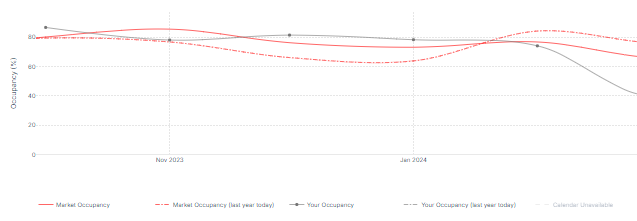
- What it is: The percentage of nights booked out of the total nights available.
- Why it matters: High occupancy is great, but only if you’re charging the right price. Low occupancy may signal demand issues or poor visibility.
- How to use it: Track occupancy over time to see if your listing is filling up faster or slower than in previous months or years. This helps you react early.
3. ADR (Average Daily Rate)
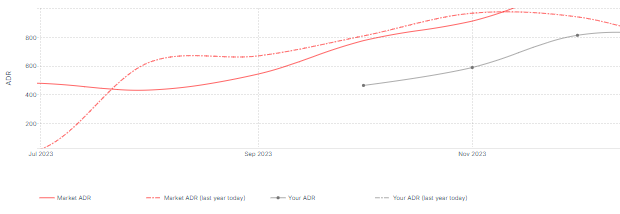
- What it is: The average nightly rate guests are paying for booked nights.
- Why it matters: A high ADR is great, but only if occupancy is healthy too. If ADR is too high, you might scare off last-minute bookers.
- How to use it: Compare your ADR with the market and your past to determine if your rates are competitive or if they need tweaking.
4. RevPAR (Revenue per Available Room)

- What it is: A combined measure of ADR and occupancy. Formula: ADR × Occupancy.
- Why it matters: It’s one of the best metrics to understand total performance. You might have high occupancy, but if rates are low, RevPAR will reflect that.
- How to use it: Use RevPAR trends to understand if you’re making the most of your calendar.
Reading the Graphs in Pacing Reports
Each pacing chart in Portfolio Analytics helps you track one of the four key metrics—Revenue, Occupancy, ADR, and RevPAR—over time.
You can view:
- Past 1 month + Next 6 months (default view)
- Or compare custom date ranges
- And do year-over-year comparisons
Here’s how to read and use them:
1. Revenue Trends (Current Dates & Custom Comparisons)
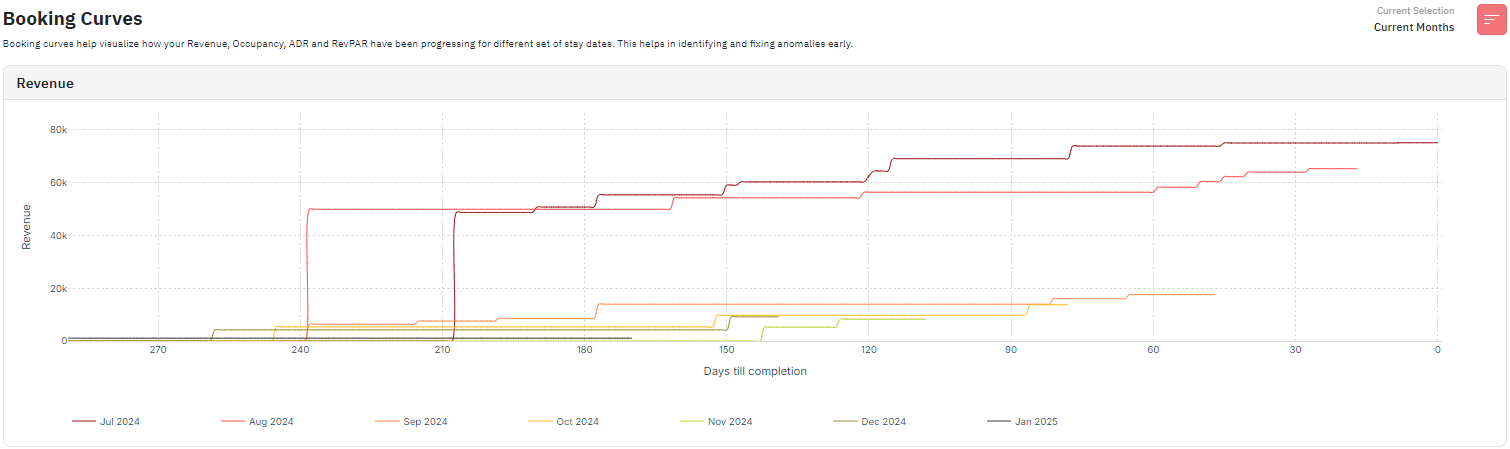
- What you see: A line chart showing how much revenue your listing has earned so far for future months.
- What to look for: Are you earning more or less revenue compared to the same time last year? Are there spikes due to holidays or events?
Example: You manage a listing in Paris. The chart shows August 2024 bookings filled up faster than usual. Why? Because of the Olympics. This tells you to increase rates earlier next year when similar demand is expected.
2. Occupancy Trends (Current Dates & Year-over-Year)
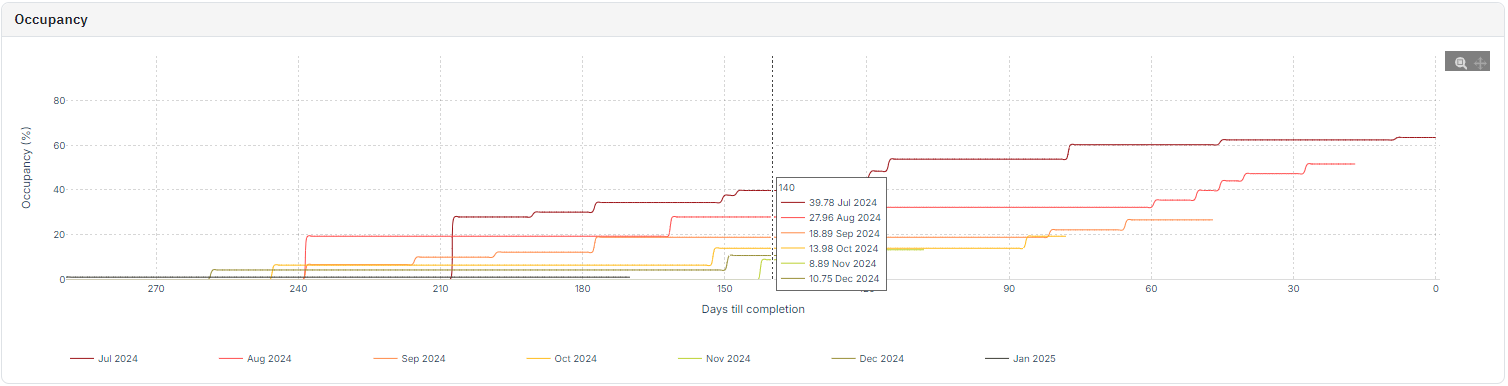
- What you see: Occupancy percentage over time.
- What to look for: How fast is occupancy picking up? Did last year perform better? Are you on track?
Example: If you’re at 30% occupancy for September and were at 45% by this time last year, it’s time to act. Try promotions, shorter minimum stays, or pricing tweaks.
3. ADR Trends (Current Dates & YOY)

- What you see: Average daily rate over time for upcoming dates.
- What to look for: Are your prices dropping too fast? Did you get higher-paying bookings earlier last year?
Example: You notice that your ADR in August is lower than last year. The bookings came in early this year—but at lower rates. This tells you to hold your price longer next year to capture higher-paying guests.
4. RevPAR Trends (Current Dates & YOY)
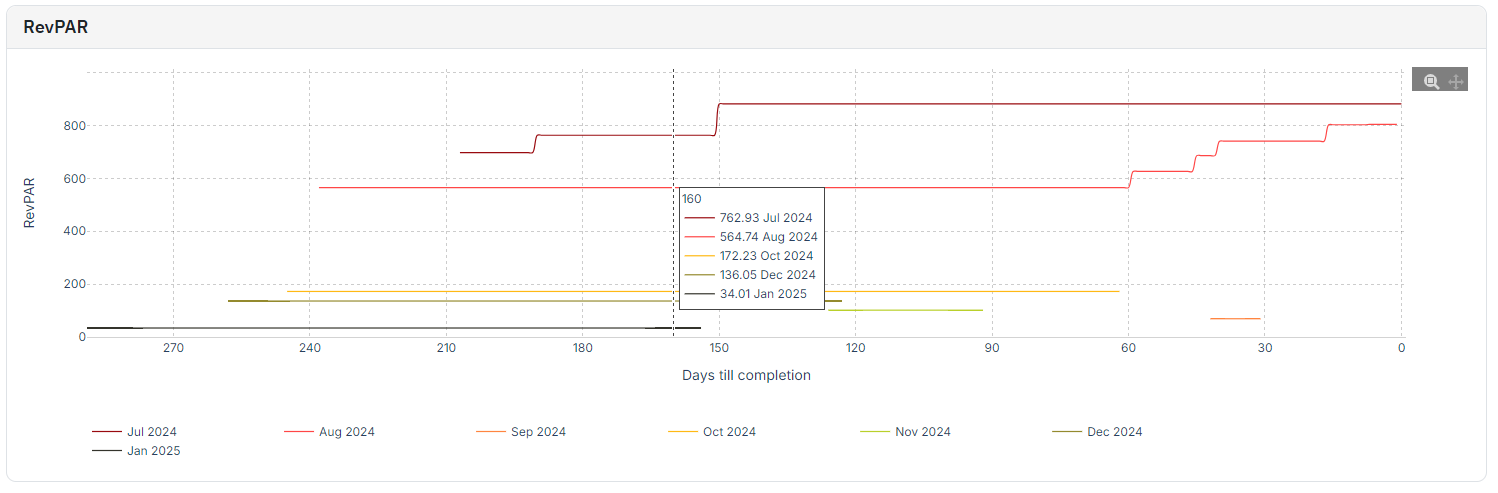
- What you see: A blend of occupancy and ADR—your true revenue efficiency.
- What to look for: Are you improving overall performance? Or just shifting the balance between rate and occupancy?
Example: In March, your ADR is high, but occupancy is low; so RevPAR is flat. In April, occupancy picks up and RevPAR jumps. This helps confirm that your price drop in April worked.

From Numbers to Strategy: Make Every Booking Count
Portfolio Analytics isn’t just a dashboard—it’s a decision-making tool that helps you run your short-term rental business with clarity and control. By tracking key metrics like occupancy, ADR, and pacing in real time, you can move beyond guesswork and make smarter choices that directly impact your revenue. Instead of reacting to last-minute booking gaps or pricing missteps, you can spot trends early, compare your performance to the market, and adjust your strategy with confidence.
Whether you manage one property or many, understanding your numbers helps you take action where it matters most—maximizing income while improving long-term performance. With the right insights, every booking becomes more than a transaction—it becomes a step toward sustainable growth. If you’re ready to run a more profitable, data-driven business, Portfolio Analytics is where that journey starts.
The post Airbnb Analytics Made Easy: How to Monitor Your STR Portfolio Performance appeared first on PriceLabs .
]]>The post 2025 Mexico City STR Outlook: Market Data, Pitfalls, and Winning Strategies appeared first on PriceLabs .
]]>
Yet, performance gains aren’t automatic. Average Daily Rates (ADR) have seen slight downward pressure, and RevPAR growth has been driven more by occupancy than price increases. With guest booking windows lengthening and competition from professionally managed listings increasing, hosts need to be deliberate about pricing, minimum stays, and booking strategies.
The latest PriceLabs data offers a clear picture of where the market is heading in 2025—and what adjustments will help you stay ahead. This article breaks down key performance trends, common pricing pitfalls, and the actions you can take now to secure more bookings and higher revenue in the year ahead.
Mexico City Market Outlook 2025
Mexico City’s STR market has outperformed most regional competitors over the past year, making it one of the strongest short-term rental destinations in Mexico for 2025.
Supply and Demand
Listings: Down 1% year-over-year (May 2024–April 2025).

Booked Nights: Up 8%, indicating demand growth despite fewer active listings.

Occupancy rate: Increased 6%, the highest among major Mexican cities.

Pricing and Revenue Metrics
ADR: Marginal decline of 1%, signaling mild pricing pressure but better resilience than Monterrey (–4%) and Guadalajara (–8%).

RevPAR: Up 8%, driven primarily by occupancy gains.

Demand is increasing faster than supply, which creates space to grow revenue. However, pricing discipline is essential while occupancy gains are strong, ADR has been flat to slightly negative, meaning rate optimization should be a key focus in 2025.
Pricing & Booking Trends
Understanding how guests are booking—and how other hosts are pricing—can help you capture more demand without leaving revenue on the table. PriceLabs data for the Mexico City market outlook shows several notable trends for 2025.
Length of Stay (LOS)

The 3–4 day stay segment generated the highest number of stay nights over the past year. Targeting this segment with optimized rates and flexible booking rules can help capture a larger share of mid-length trips.
Booking Window

The average booking window increased by 10% in the last 12 months, meaning guests are booking earlier. A longer lead time gives you more room to test rates and adjust based on pacing before check-in dates.
Dynamic Pricing Adoption
Maximize Your Vacation Rental Return with Dynamic Pricing!
Boost occupancy & optimize revenue with PriceLabs’ Dynamic Pricing & Revenue Management tool. Implement a smart pricing strategy based on market conditions, seasonality & competition for excellent ROI.
Get Started Now40% of listings in Mexico City use moderate to high dynamic pricing.

Hosts using moderate or high dynamic pricing saw:
17% higher occupancy

30-45% higher ADR compared to static pricing.

51–71% higher RevPAR compared to static pricing.

Despite these benefits, the majority of listings (36%) still rely on static or low dynamic pricing, leaving significant performance gains untapped.
Takeaway for Hosts: To compete effectively, aim to:
- Align pricing and minimum stays with the 3–4 day booking sweet spot.
- Adjust rates proactively for the longer booking window trend.
- Adopt at least moderate dynamic pricing to match top-performing peers and boost both occupancy and revenue.
You can use the World STR Index by PriceLabs to track your market’s performance, understand demand, and gain insights similar to those we’ve discussed in this article.

The World STR Index by PriceLabs is a free tool for tracking short-term rental market performance worldwide. It offers data from 2021 to the next year, refreshed monthly.
Key features include:
- Compare: Compare year-over-year metrics like active listings, occupancy rates, RevPAR, and ADR.
- Trend: Visualize how metrics have changed over the past years.
- Pacing: Compare upcoming year metrics to the previous year for occupancy, ADR, and RevPAR.
4 Common Pricing Pitfalls & How to Avoid Them
Mexico City market outlook is competitive in 2025, with booked nights rising 8% and occupancy growing faster than in any other major Mexican city. But market growth doesn’t guarantee higher income. Many hosts still underperform because their pricing strategies aren’t in sync with guest behavior, seasonal patterns, or market shifts.
Based on PriceLabs data, here are four high-impact pricing pitfalls to avoid—along with precise, actionable steps to turn them into revenue opportunities.
1. Ignoring Seasonality

Why this hurts performance: Mexico City’s demand patterns are far from flat. Between seasonal tourism peaks (e.g., Easter week, summer holidays, Dia de los Muertos) and business travel cycles, demand can swing significantly.
- If you price too low in high season → You sell out early and miss last-minute booking premium rates.
- If you price too high in low season → Your property sits vacant while competitors secure discounted bookings.
Historical pacing charts show that occupancy spikes during peak seasons fill earlier, while low-season bookings are price-sensitive and often happen closer to check-in.
How to fix it:
- High season: Raise rates progressively as availability shrinks. Focus on being “last to book” at the top of the rate curve.
- Low season: Offer competitive early rates and promotions to lock in demand before competitors drop prices.
- Track both citywide trends and your property’s historical seasonality for precision.

2. Rigid Minimum Stay Rules

Why this hurts performance: A fixed year-round minimum length of stay (LOS) doesn’t reflect how demand shifts across seasons.
- Too high in low season → Blocks short-stay bookings and lowers occupancy.
- Too low in high season → Increases turnovers, cleaning costs, and operational strain without maximizing revenue per stay.
In Mexico City, the 3–4 day LOS generates the most total stay nights, making it the “sweet spot” for 2025.
How to fix it:
- In high season, lengthen minimum stays to capture high-value multi-day bookings with fewer turnovers.
- In low season, drop restrictions to attract short, gap-filling stays.
- Review LOS performance quarterly to adapt rules.

3. Ignoring the Booking Window

Why this hurts performance: Without tracking the booking window (how far in advance guests book), hosts risk:
- Discounting too early, selling out at lower-than-necessary rates.
- Keeping prices too high until the last minute, leading to unsold nights.
Mexico City’s average booking window increased by 10% in the last year, meaning guests are planning further ahead.
How to fix it:
- For early bookers: Keep rates strong and avoid heavy discounts far in advance.
- For last-minute gaps: Adjust pricing dynamically 7–14 days before check-in to attract remaining demand.
- Use pacing reports to compare your property’s booking curve with the market.

4. Not Using Revenue Management Tools

Why this hurts performance: Manual pricing can’t keep up with daily shifts in demand, local events, competitor changes, and seasonal patterns.
Static pricing in Mexico City underperforms dynamic pricing by 17% in occupancy and 51–71% in RevPAR.
How to fix it:
- Adopt a dynamic pricing platform that automatically updates rates based on demand, events, competitor pricing, and occupancy pacing.
- Set seasonal and event-based min/max limits to protect margins.
- Review automated changes regularly to ensure alignment with your business goals.

Final Thoughts: Demand and Occupancy Are Increasing. Mexico City is Stronger Than Ever.
Mexico City’s short-term rental market is entering 2025 in a position of strength. Demand is rising, occupancy growth is the highest among major Mexican destinations, and ADR stability offers room for strategic price increases. For hosts, the opportunity lies in turning these market conditions into measurable revenue gains.
With demand outpacing supply, 2025 is a year where well-prepared Mexico City hosts can grow both occupancy and revenue. The difference between average and top performance will come down to data-driven pricing decisions, flexibility in booking rules, and smart use of technology to stay ahead of the market.
The post 2025 Mexico City STR Outlook: Market Data, Pitfalls, and Winning Strategies appeared first on PriceLabs .
]]>The post Property Management Checklist: Guide for Rental Owners appeared first on PriceLabs .
]]>Download Our Free Property Checklist Now To Manage Your Listing Efficiently!
A ready-to-use property manager duties checklist that helps rental owners assign tasks, track responsibilities, and keep operations consistent across every stay.
Download It NowStep-by-Step Guide: How to Build Your Own Property Management Startup Checklist
Creating your property management onboarding checklist is less about copying a generic template and more about tailoring it to your rental’s unique setup.
Here’s a detailed process that hosts can follow:
Step 1: Define Your Rental Goals
- Short-term vacation rental: Focus on high turnover, cleaning checklists, guest communication templates, and pricing optimization.
- Mid-term rental (1–6 months): Prioritize contracts, background checks, utilities management, and clear lease terms.
- Long-term rental: Emphasize legal compliance, tenant screening, maintenance scheduling, and landlord-tenant laws.
Why this matters: Your goals determine the structure of your checklist. A short-term Airbnb listing, for example, needs a stronger emphasis on guest experience and reviews, while a year-long rental requires more attention to compliance and property upkeep.
Step 2: Break Tasks Into Stages
Divide your checklist into three categories so it’s easier to manage:
- Pre-listing Checklist
- Documentation and permits
- Property inspection and safety checks
- Professional photos and listing description
- Pricing strategy setup
- Pre-guest Checklist
- Housekeeping and restocking supplies
- Key handover or smart lock setup
- Guest welcome book/manual
- Communication templates prepared
- Ongoing Checklist
- Preventive maintenance
- Guest feedback and review monitoring
- Seasonal updates (holiday décor, HVAC servicing, pool prep)
- Revenue performance reviews
Why this matters: Breaking tasks into phases prevents overwhelm and ensures nothing slips through the cracks during transitions.
Step 3: Assign Responsibilities
A checklist is only useful if each task has an owner. Even if you self-manage your property, it’s worth noting who handles what.
- Owner’s duties: Legal compliance, pricing, vendor contracts, inspections.
- Housekeepers: Cleaning, linens, supplies restock.
- Maintenance staff/vendors: Repairs, landscaping, HVAC servicing, pest control.
- Co-host or property manager: Guest communication, check-ins/outs, emergency response.
Why this matters: Clear roles reduce confusion, avoid duplicated effort, and ensure accountability.
Step 4: Use Templates and Repeat
- Create cleaning checklists to make turnovers consistent and easy to delegate.
- Draft guest communication templates (welcome, check-in, check-out, review request).
- Standardize maintenance checklists (monthly, seasonal, annual).
Why this matters: Templates make your rental scalable. Even if you expand to more properties later, your operations will stay consistent.
Step 5: Review and Refine Regularly
- After every 5–10 guest stays, revisit your checklist. Did anything cause confusion or complaints?
- Review your reviews: if guests mention missing items, unclear instructions, or maintenance problems, add solutions to your checklist.
- Adapt to market changes: adjust pricing, upgrade amenities, or revise cleaning protocols based on occupancy and competition.
Why this matters: A property management onboarding checklist isn’t static—it should evolve with guest expectations, technology, and local regulations.
Why Skipping a Checklist Costs Rental Owners
Many rental owners learn the hard way that trying to “wing it” without a structured checklist comes with consequences.
Here’s what can go wrong:
- Missed compliance and legal requirements: Failing to secure permits, licenses, or adequate insurance can lead to fines or the suspension of your rental activities.
- Inconsistent guest experiences: Small oversights—like missing essentials, unclear house rules, or broken appliances—directly impact guest satisfaction and reviews, which in turn affect occupancy rates.
- Operational inefficiencies: Without a clear process, routine tasks like housekeeping, maintenance, or restocking can fall through the cracks. This leads to unnecessary delays and higher long-term costs.
- Overlooked revenue opportunities: A poorly optimized listing, missing photos, or outdated pricing can cause your property to underperform compared to competitors.
A checklist isn’t just about staying organized—it’s a safeguard against revenue loss, reputational damage, and unnecessary stress.
Benefits of a Property Management Onboarding Checklist
A property management onboarding checklist does more than keep you organized—it sets the foundation for long-term rental success. By standardizing every step, it ensures that no detail is left to chance.

- Consistency across every stay: Guests expect a professional, seamless experience. A checklist helps maintain the same standards each time, whether it’s your first booking or your hundredth.
- Accountability for everyone involved: When tasks are documented, it’s easier to assign responsibilities to cleaners, maintenance staff, or co-hosts. This prevents confusion and reduces last-minute scrambles.
- Efficiency in daily operations: Instead of reinventing the wheel for each booking, you save time with predefined processes. This frees you to focus on growth rather than firefighting.
- Peace of mind for owners: Knowing that safety checks, guest amenities, and pricing adjustments are already covered reduces stress and helps avoid costly oversights.
- Professional presentation: A checklist reflects a commitment to quality and professionalism, which not only reassures guests but can also attract better reviews and repeat stays.
In short, the right onboarding checklist transforms your rental from a reactive setup into a structured, scalable operation.
The Essential Property Management Checklist for Rental Owners
Every rental owner’s needs are slightly different, but most successful operations follow the same foundational steps. Below is a practical breakdown of what your property management onboarding checklist should cover.

1. Documentation & Legal Setup
- Gather ownership records, tax IDs, and rental agreements.
- Secure the necessary permits and licenses for short-term or long-term rentals.
- Confirm that you have the right type of insurance (liability, property, or short-term rental coverage).
- Document local regulations, zoning rules, and occupancy limits to avoid compliance issues.
2. Property Inspection Checklist
- Test all safety features: smoke detectors, carbon monoxide alarms, fire extinguishers, and locks.
- Verify utilities: water, electricity, heating, cooling, and WiFi.
- Check appliances and electronics to ensure everything is working.
- Assess cleanliness standards before the first guest checks in.
- Inspect furniture and décor for damage or wear that could affect guest comfort.
3. Property Setup & Guest Experience
- Stock essential supplies: toiletries, linens, kitchenware, and cleaning products.
- Ensure furniture is arranged for comfort and functionality.
- Add personal touches: décor, local guidebooks, or welcome baskets.
- Create a welcome manual with check-in/out instructions, house rules, and emergency contacts.
4. Property Management Maintenance Checklist
- Build a preventive maintenance schedule (HVAC servicing, plumbing checks, seasonal deep cleans).
- Maintain vendor contacts for housekeeping, landscaping, pest control, and pool services.
- Set up a system for reporting and resolving issues quickly, whether through a co-host, app, or maintenance log.
5. Operational & Communication Setup
- Prepare guest messaging templates for pre-arrival, check-in, check-out, and follow-ups.
- Establish emergency protocols (power outages, lockouts, natural disasters).
- Clearly communicate house rules on noise, pets, smoking, and occupancy.
- Define check-in/check-out procedures (self-check-in, key handoff, smart locks).
6. Pricing & Listing Optimization
- Set base price and adjust for seasonality and local demand.
- Research competitors to ensure your listing is competitive.
- Upload high-quality photos that highlight your property’s best features.
- Write an engaging, keyword-optimized description to improve search ranking.
Maximize Your Vacation Rental Return with Dynamic Pricing!
Boost occupancy & optimize revenue with PriceLabs’ Dynamic Pricing & Revenue Management tool. Implement a smart pricing strategy based on market conditions, seasonality & competition for excellent ROI.
Get Started NowFinal Thoughts: Why Every Rental Owner Needs a Property Management Onboarding Checklist
Running a rental property without a checklist is like trying to manage a business without a plan—eventually, something will slip through the cracks. From legal compliance and property inspections to guest communication and ongoing maintenance, each part of the process builds the foundation for your success.
A property management checklist ensures:
- Nothing important is overlooked during setup or turnovers.
- Responsibilities are clear and tasks get completed on time.
- Guest experiences remain consistent, professional, and review-worthy.
- Owners can scale operations smoothly without added stress.
For hosts, especially those managing their rentals independently, adopting a structured onboarding checklist isn’t optional—it’s essential. It protects revenue, reputation, and peace of mind.
And while your checklist will cover operations, maintenance, and guest experience, don’t forget that your pricing strategy is just as critical to long-term success. That’s where solutions like PriceLabs help by simplifying dynamic pricing and ensuring your property stays competitive in the market.
A good property management onboarding checklist sets you up for operational success. Pair it with smart pricing practices, and you’ll have the confidence to run your rental like a true professional.
Frequently Asked Questions
1. What is a property management checklist?
A property management checklist is a structured guide that covers legal, operational, and guest-preparation tasks for rental owners. It ensures nothing is overlooked during onboarding or turnovers, helping maintain consistency, compliance, and guest satisfaction across every stay.
2. Why do rental owners need a property management onboarding checklist?
Rental owners need an onboarding checklist to streamline setup, prevent costly mistakes, and improve efficiency. It provides clarity on responsibilities, ensures safety and compliance, and creates a professional guest experience that leads to better reviews and repeat bookings.
3. What should be included in a property management startup checklist?
A property management startup checklist should include documentation, permits, property inspections, guest amenities, maintenance schedules, communication templates, and vacation rental pricing strategy. Breaking these into pre-listing, pre-guest, and ongoing tasks helps rental owners manage operations more effectively from day one.
The post Property Management Checklist: Guide for Rental Owners appeared first on PriceLabs .
]]>The post What Is a Good ROI on Rental Property? appeared first on PriceLabs .
]]>In this ultimate guide, we’ll go over how to calculate ROI on rental properties, how it compares to other metrics, what is considered a good ROI on rental property, and how to enhance the performance of your investment property. We’ll also show you how tools like PriceLabs can help you optimize pricing and occupancy to maximize your bottom line.
Return on Investment (ROI): What is it in Real Estate Investing?
Return on investment (ROI) is a metric commonly used to evaluate the profitability of an investment in relation to its total cost. For rental properties, ROI refers to the profit you’re making from the property relative to how much money you’ve spent on it. It is one of the main vacation rental KPIs.
ROI Formula
ROI = Net Annual Profit/Total Investment x 100%

How Do I Calculate Rental Income?
To calculate the rental income of your Airbnb property, use the following formula:
Gross Rental Income = Average Daily Rate (ADR) x Occupancy Rate
Stay Ahead of the Market and Understand Your Property's Performance in Comparison to the Market.
Use PriceLabs Portfolio Analytics and Neighborhood Data to track competitor pricing and demand shifts and analyze past performanceTo accurately calculate and analyze the earning potential of a short-term rental property before buying it, use the PriceLabs Revenue Estimator Pro.
Get Started Today.To make things clearer for first-time investors, let’s take a look at a concrete example.
ROI Example
Consider the following scenario. An investor buys an Airbnb property and yields these financial results:
- Purchase Price: $350,000
- Closing Costs: $8,700
- Renovation Costs: $15,000
- Furniture Cost: $20,000
- Annual Rental Income: $55,000
- Annual Operating Expenses (including Airbnb management fees, cleaning, restocking, insurance, taxes, and maintenance): $20,000
ROI = ($55,000 – $20,000)/($350,000 + $8,700 + $15,000 + $20,000) x 100%
ROI = 8.89%
So, the return on this rental property is 8.89% per year.
Cap Rate vs ROI
The capitalization rate (cap rate) is another measure of profitability in real estate investing. Although it is often confused with ROI, these are two distinct metrics that serve different purposes and are calculated differently.
The cap rate evaluates a rental property’s income potential relative to its current market value (CMV). It doesn’t consider the method of financing. Meanwhile, the ROI takes into account the total investment, including mortgage payments. This makes return on rental properties a more comprehensive measure of long-term profit.
Cash on Cash Return vs ROI
Both the cash on cash return (CoC return) and ROI assess rental property performance, but they focus on different aspects.
The cash-on-cash return measures the annual pre-tax cash flow relative to the actual cash invested. This makes it a particularly good metric for financed properties. The return on investment, on the other hand, evaluates total profitability over time. Thus, the average ROI on a real estate property provides a broader picture of the overall investment performance.
What Is a Good Return on a Rental Property?
There is no single best ROI for a rental property as it depends on a number of factors. Still, most real estate experts agree that a good ROI for a rental property is in the range of 5-10%.
A higher return on a rental property – 15%+ – is sometimes possible in high-demand or emerging markets, but it comes along with greater risk.
Lower ROI – 5-7% – might be good if you invest in a property in stable, sub-urban markets where appreciation is the main driver of profit. This lower return brings lower risk too.
Maximize Your Vacation Rental Return with Dynamic Pricing!
Boost occupancy & optimize revenue with PriceLabs’ Dynamic Pricing & Revenue Management tool. Implement a smart pricing strategy based on market conditions, seasonality & competition for excellent ROI.
Get Started Now6 Factors That Affect Rental Property Return on Investment
It is hard to say what a good return on a rental property is because it depends on many factors.
The main drivers of ROI include:
- Location: Where you invest in a rental property is the single most crucial factor determining its performance. It affects everything – from sales price and management costs, to rental demand and rental rates.
- Property type: Single-family homes tend to bring higher ROI than apartments and condos, in most markets.
- Management strategy: Professionally managed short-term rentals perform better, but you have to factor in monthly fees into your ROI calculations.
- Purchase price: The amount you spend on the property directly impacts its profitability, as it is factored into the ROI formula. It’s worth trying to negotiate a better price before settling.
- Financing method: The loan terms, duration, and interest rates affect the return on leveraged rentals as they impact the total investment.
- Occupancy rate: A Higher Airbnb occupancy rate translates into more rental income, which means a higher ROI. Deploy a smart Airbnb pricing strategy to maximize return.
How to Improve the Return on Your Rental Property: 5 Tips
The following proven tips will help you maximize the ROI of your short-term rental:
- Target high-demand markets: Before you buy a property, use real-time, local market data to choose a location with strong potential.
- Invest in property upgrades: Focus on furniture and appliances that attract high-quality guests and increase daily rates.
- Improve your listing: Optimize your Airbnb listing to get more bookings and maximize vacation rental revenue.
- Automate property management: Adopt a property management system (PMS) to cut operational costs and optimize processes.
- Set competitive rates: Use Dynamic Pricing tools like PriceLabs to implement a smart vacation rental pricing strategy. This strikes the right balance between nightly rates and occupancy to maximize rental income.
Maximizing ROI on Short-Term Rental Properties with the Help of Technology
Maximizing your return on rental property boils down to choosing the right market, boosting occupancy, enhancing daily rates, keeping expenses at bay, and making smart, data-based decisions. In other words, your long-term success depends on optimizing both rental income and operating costs.
Technology plays a vital role in this process. You can dynamically adjust nightly prices based on demand and comps with tools like PriceLabs’ Dynamic Pricing. You can benchmark your property’s performance against local trends to increase ROI with Market Dashboards. You can track performance to ensure upward trends with Portfolio Analytics.
By leveraging the power of smart technology, such as PriceLabs, you can increase bookings, reduce vacancy, optimize daily rates, and – ultimately – boost the return on your vacation rentals without extra manual work.
Frequently Asked Questions
1. What Is the 2% Rule for Rental Property?
According to the 2% rule, a rental property is a good deal if the monthly rent is equivalent to at least 2% of the purchase price. For example, a property that costs $200,000 should rent out for at least $4,000 per month.
2. What Is the 50% Rule in Rental Property?
The 50% rule suggests that about 50% of the rental income goes towards operating expenses excluding mortgage. So, if you earn $3,000 in monthly rent, you can expect $1,500 in operating costs.
3. What Is ROI in Simple Terms?
Simply put, the ROI measures how much profit you make from a rental compared to what you spend on the property. It tells you how much money your investment is making.
The post What Is a Good ROI on Rental Property? appeared first on PriceLabs .
]]>The post Vacation Rental Podcasts Every Vacation Rental Pro Should Be Listening To appeared first on PriceLabs .
]]>The David Greene Show

Hosted by David Greene, “Real Talk Real Estate” lives up to its name by pulling back the curtain on the often unseen aspects of the real estate business and investing. David shares unfiltered stories, insider details, and expert insights, making it a valuable listen for anyone looking to understand the realities behind real estate success. Whether you’re aiming to invest, build a real estate career, or simply want an unvarnished look at the industry, this show from our list of vacation rental podcasts promises to inform and engage.
The Real Estate Podcast by BiggerPockets

As the flagship audio show from BiggerPockets, “The Real Estate Podcast” provides a comprehensive exploration of real estate investing strategies that work. With new episodes three times a week, hosted in part by Dave Meyer, the Head of Real Estate at BiggerPockets, listeners can expect inspiring stories, deep dives into tactics, market analysis, and news breakdowns. This one from our list of vacation rental podcasts is designed to empower listeners to take informed action towards achieving financial freedom through real estate.
Host Planet

From James Varley, the Founder and CEO of Host Planet, comes a podcast that’s part of a rapidly growing multimedia platform explicitly dedicated to the short-term rental industry. This one from our list of vacation rental podcasts explores current trends, strategies, and insights relevant to hosts and those in the STR industry.
Boostly Podcast

If you’re looking to take control of your bookings and reduce reliance on OTAs, the Boostly Podcast, hosted by Mark Simpson and Liam Carolan, is one to check out. With a deep archive of over 700 episodes, this podcast focuses on strategies for securing direct bookings. Liam also hosts the “Behind The Host” mini-series, offering glimpses into the journeys of successful hosts. Expect actionable advice and insights to help you gain independence in the hospitality industry.
STR Riches

Hosted by Tim Hubbard, the CEO of a successful seven-figure short-term rental management company and an experienced investor, STR Riches delivers insider tips for acquiring, operating, and scaling a thriving short-term rental business. If you’re looking for practical, real-world advice from someone who’s achieved significant success in the STR space, this podcast could be a valuable resource.
STR Secrets

The Short Term Rental Secrets Podcast, hosted by Mike Sjogren and Emanuele Pani, is dedicated to providing actionable content for both new and seasoned real estate investors looking to launch, automate, and scale their Airbnb businesses. The podcast aims to fast-track listeners’ journey to financial freedom through strategic insights and practical advice in the short-term rental market.
STR Unfiltered

Hosted by Bill Faeth, STR Unfiltered aims to break down the ins and outs of short-term rental hosting, providing listeners with actionable advice to elevate their businesses. Whether you’re just starting or looking to reach new heights, this podcast promises to deliver insights from experienced voices in the STR world.
Wanderlust Wealth

Hosted by Olivia Tati, Wanderlust Wealth connects the passions of world travel and entrepreneurship, with a strong focus on strategic real estate investing. Through impactful interviews and Olivia’s personal experiences, the podcast explores how to build the life you desire through real estate and entrepreneurship. If you’re a wanderluster with a business mindset, this podcast offers inspiration and practical strategies.
RevLabs by PriceLabs

A must-listen for revenue managers in the short-term rental space. Each episode of RevLabs by PriceLabs is packed with concrete advice and true stories aimed at helping you, the leaders of large short-term rental portfolios, navigate the complexities of vacation rental pricing and market trends confidently.
We understand your unique challenges – from adjusting strategies on the fly to staying ahead in a competitive market. That’s why we host real conversations with seasoned revenue managers mixed in with expert insights from PriceLabs.
For more incredible insights and voices in the short-term rental industry, don’t forget to check out our recent article highlighting the “Top Women Voices to Follow in the Short-Term Rental Industry.” You might recognize some familiar names, like Heather Bayer, who also hosts the “Vacation Rental Success” podcast, Avery Carl, and Natalie Palmer, each offering their unique perspectives and expertise in the world of STR. Their vacation rental podcasts are also fantastic resources to add to your listening list!
The post Vacation Rental Podcasts Every Vacation Rental Pro Should Be Listening To appeared first on PriceLabs .
]]>The post What to Expect From Monthly Rentals in 2026: Trends, Tech, and Tenant Behavior appeared first on PriceLabs .
]]>The local regulatory landscape is also favouring mid-term rentals. In this article, we’ll define the monthly rental model, compare its performance against nightly STRs, spotlight the top markets of 2025, explore tenant behaviors and emerging technologies, and outline the steps you need to launch a compliant, profitable monthly-rental business.
What Exactly Is a Monthly (Mid-Term) Rental?
A monthly (mid-term) rental is a property leased for stays longer than a typical nightly booking but shorter than a conventional one-year lease—generally between 30 and 180 days. These mid-term rental agreements often include utilities, internet, and basic furnishings, creating a turnkey living experience for tenants.

The stay runs from one month to six months. Shorter or longer terms can be negotiated, but this window balances flexibility and stability for both hosts and tenants. Most common ones are furnished rentals that cater to traveling professionals, healthcare workers, and digital nomads who need immediate, comfortable housing. Unfurnished options may appeal to tenants planning longer stays in personalized spaces – with them, you’ll have to be wary of squatters.

What are the Various Tenant Types?
- Remote workers & digital nomads seeking a “home base” for multi-week projects
- Travel nurses & healthcare professionals on temporary assignments
- Corporate transferees & relocation clients in between leases
- Graduate students & interns needing temporary housing
By offering a middle ground between short-term volatility and long-term commitment, monthly rentals deliver a steadier occupancy rate and a predictable revenue stream for hosts, while providing tenants with the convenience and comfort of a furnished home away from home.
Market Trends Shaping Monthly Rentals
As monthly rentals eclipse the old “mid-term rental” terminology—Google searches for “monthly rentals” now outpace “mid-term rentals” by fifty-fold—the market is responding with rapid supply growth and surging demand.

- Platform Supply: Furnished Finder leads the space with roughly 300,000 furnished monthly listings, compared to about 80,000 on Apartments.com and 36,000 on Zillow. Hosts have more channels than ever to attract longer-stay tenants.
- Demand Surge: In 2025, Furnished Finder logged over 2 million tenant inquiries—a 105% year-over-year increase—highlighting the shift toward stable, month-long stays.
Major real-estate marketplaces like Apartments.com and Zillow are doubling down on multi-family and furnished offerings, signaling industry confidence that monthly rentals will continue to expand. This suggests that savvy hosts who position their properties for longer stays will benefit from both increased visibility and a growing pool of qualified tenants.
Are Monthly Rentals Profitable?
When evaluating profitability, it helps to compare average daily revenue (ADR) and occupancy for short-term rentals (STRs) versus monthly (mid-term) rentals (MTRs) in the same market. MTRs yield a steadier income stream—even if the nightly ADR is lower—because occupancy consistently hovers around 85–90%, compared to 55–65% for STRs.
1. ADR & Occupancy
In high-demand markets like New York or San Francisco, STR ADR averages around $250–$300 per night, translating to about $7,500–$9,000 per month at full occupancy—but typical occupancy is only 60%, netting $4,500–$5,400.
The same listings as MTRs command around $2,200–$2,500 per month with occupancy near 90 percent, yielding $1,980–$2,250 reliably each month.
2. Seasonality & Stability
STRs spike during peak travel seasons but drop off sharply in off‐peak months. MTRs smooth out those seasons, delivering a predictable baseline even when tourist bookings wane.
Overall, MTRs trade a higher top-end for consistent occupancy and cash flow—making them an attractive complement to a traditional short-term rental strategy.
Top Monthly Rental Markets for 2025
Below is a detailed look at the top ten cities by listing count, occupancy rate, average daily rate (ADR), and revenue per available rental (RevPAR):

What do you need to know from this data?
- Mega Markets (High Supply & Demand): New York City and Los Angeles lead in supply (12,753 and 8,081, respectively). New York balances volume with a solid 62% occupancy and $110 RevPAR. Los Angeles trades some occupancy (49%) for a premium ADR of $298, driving RevPAR up to $145.
- High-Occupancy Destinations: Barcelona achieves the highest occupancy (73%), translating to consistent cash flow despite a modest ADR of $113. San Francisco follows at 64%, yielding $133 RevPAR—proof that strong ADR plus decent occupancy pays off.
- Premium-Rate Cities: Vancouver’s $293 ADR delivers the highest RevPAR ($153), even at 52% occupancy, making it attractive for hosts targeting fewer but higher-paying bookings. New Orleans and Chicago show the opposite: lower occupancy (39–45%) and RevPAR ($75–$89), indicating potential for growth if hosts can boost marketing or adjust pricing.
- Stable Mid-Tier Markets: Montréal, Philadelphia, and Washington each offer balanced opportunities (50–63% occupancy, $77–$92 RevPAR), ideal for hosts seeking predictable, lower-volatility returns.

For hosts evaluating expansion, these metrics—especially RevPAR and occupancy—can guide where to invest in new properties or shift marketing focus to maximize monthly-rental performance in 2025.
Tenant Behaviors & Preferences in 2025
In 2025, monthly renters will continue to seek comfort and reliability, but their expectations are evolving rapidly as lifestyles change.

Here’s what hosts need to know to connect better with these renters:
1. Renters Plan Further Ahead
Mid-term rentals now have a 36-day booking window, which is two days longer than last year. For hosts, this means anticipating demand earlier and setting rates to ensure steady occupancy throughout the year.
2. Pets Are More Important Than Ever
A significant shift is that nearly 32% of bookings now include pets, marking an 18% increase year-over-year. To capture these bookings, consider clearly outlining pet policies, adding pet-friendly amenities, and creating a welcoming environment for pet owners.
3. Who’s Renting Monthly Stays
Your ideal tenants typically fall into these main categories:
- Business Travelers & Digital Nomads (35%): Prioritize comfortable, furnished workspaces, reliable Wi-Fi, and flexible lease terms.
- Healthcare Professionals (25%): Look for clean, quiet spaces close to hospitals and medical centers.
- Relocation & Academic Renters (30% combined): Appreciate turnkey homes with ample storage, fully stocked kitchens, and practical, everyday amenities.
4. Smaller Groups and Units Dominate
On average, each stay now includes around 2.6 guests, up significantly from previous years.

About 70% of stays involve three or fewer occupants, highlighting a strong preference for smaller units. This is how demand shifts according to property type:
- Studios & 1-bedroom units account for 55% of total demand.
- Two-bedroom apartments make up about 25%, while larger units (3+ bedrooms) represent just 20%.
How to Start a Monthly Rental Business?
Launching a successful monthly rental means combining smart prep, tech tools, and local know-how.
Here’s a streamlined path to get started:
- Research the Market: Understand the PriceLabs Market Dashboards to analyze occupancy and RevPAR in target markets.
- Understand Local Regulations: Check local regulations for length-of-stay rules, registration, zoning, and taxes before listing.
- Furnish a Tenant-Ready Unit: Include quality essentials like a comfortable bed, blackout curtains, high-speed Wi-Fi, and in-unit laundry. Add small touches like welcome kits and pet amenities to stand out.
- Price It Strategically: Set your monthly base price using the Base Price Help Tool, then apply PriceLabs Dynamic Pricing to adjust for local demand shifts, seasons, and events.
- List Across Multiple Platforms: Publish on Furnished Finder, Apartments.com, Zillow, and your own site. Use detailed descriptions, strong keywords, and professional photos to attract the right tenants.
- Screen & Lease Efficiently: Run background and employment checks, and use e-signature tools for fast, secure lease agreements and deposit collection.
- Automate & Optimize Operations: Set smart calendar rules, automate tenant messages, and monitor results using PriceLabs Portfolio Analytics to tweak pricing and stay competitive.
With these essentials in place, you’ll be ready to launch a smooth, compliant, and revenue-strong monthly rental business.
Legal Considerations for Monthly Rentals
To run a compliant and protected monthly rental business, hosts should focus on four key legal areas:
- Zoning & Registration: Understand local rules—many cities allow stays over 30 days without a short-term rental license, but you may still need to register. Fines for non-compliance can exceed $1,000 per property. Join local STR groups or forums to stay informed and adjust proactively.
- Lease Agreements: Monthly rentals fall under landlord-tenant laws. Clearly define rent terms, notice periods, maintenance responsibilities, and early termination policies in your lease.
- Tax Compliance: Some areas apply lodging taxes to stays under six months. Report earnings accurately and consult a tax advisor to stay on top of both local and federal obligations.
- Insurance Coverage: Standard homeowner policies often don’t cover extended stays. Get landlord or rental-specific insurance that includes property damage, liability, and income loss.
Taking care of these essentials upfront helps you avoid penalties, maintain smooth operations, and safeguard your revenue.
How to Future-Proof Your Monthly Rental Business?
According to Furnished Finder, these are the markets that you should focus on:

What should you do once you know where to build your mid-term rental business:
- Furnish for Real Life: Prioritize comfort—a good bed, fast Wi-Fi, blackout curtains, laundry.
- Use Smart, Dynamic Pricing: Set a solid base rate using comparables, then let PriceLabs Dynamic Pricing adjust for demand, seasonality, and local events.
- Diversify Where You List: Publish on Furnished Finder, Zillow, Apartments.com, and your own site. Great photos, SEO-friendly descriptions, and strong keywords attract better tenants.
- Streamline Leasing: Run background and income checks, then close deals quickly using e-signatures and online payments.
- Focus on Long-Term Relationships: Deliver a great tenant experience. Happy tenants mean better reviews, referrals, and fewer marketing costs.
By remaining adaptable, informed, and proactive, you’ll secure the sustainability and ongoing profitability of your monthly-rental business.
How Can PriceLabs Help Mid-Term Rental Hosts?
Running a successful monthly rental takes more than just listing your place and hoping for the best. You’re constantly juggling market analytics, pricing strategy, and what tenants actually want.
That’s a lot to manage—and that’s exactly where PriceLabs comes in.
With Dynamic Pricing, your monthly rates adjust automatically based on local demand, seasonality, and competitor data. No more second-guessing what to charge—just smarter pricing that helps you stay booked and profitable.

Want to know how your listings are doing? The Portfolio Analytics dashboard gives you a simple, at-a-glance view of performance across all your properties. You can spot what’s working (and what’s not) without digging through spreadsheets.

Looking to grow your business? Use Market Dashboards to understand the competition in any neighborhood, and Revenue Estimator Pro to forecast what you could actually earn before you invest.

PriceLabs gives you the tools to run your rentals with less guesswork and more confidence—so you can focus on what really matters.
Frequently Asked Questions
1. Do I need special insurance for monthly rentals?
Yes. Regular homeowner insurance usually won’t cut it. You’ll want a landlord or rental-specific policy that covers things like property damage, liability, and tenant-related issues for longer stays.
2. What do monthly renters look for in a space?
Think comfort and convenience. Strong Wi-Fi, a decent workspace, in-unit laundry, pet-friendly policies, and a fully furnished setup are all big wins. These features make your place feel more like home—and help it stand out.
The post What to Expect From Monthly Rentals in 2026: Trends, Tech, and Tenant Behavior appeared first on PriceLabs .
]]>The post Vrbo Guest Reviews: How to Manage Them as a Host appeared first on PriceLabs .
]]>In this article, we’ll walk you through everything you need to know about Vrbo guest reviews: From what they are and how they work, all the way to how to write a review on Vrbo and how to respond to reviews by guests. Plus, we’ll give you real-life templates that you can start using right away to boost the performance of your listing while saving time and effort.
What Are Vrbo Guest Reviews?
Reviews on Vrbo refer to two distinct things. First, after checkout, guests can rate the property and their stay on a scale of 1 to 5 stars in addition to filling in some required fields to show what they liked and what they didn’t like about the experience and the host.

At the same time, hosts can also review guests who have stayed at their STR in a similar manner. They can give a 1 to 5 Vrbo rating across a number of categories such as Overall Experience, Cleanliness, House Rules, and Communication, to highlight the best and the worst aspects of hosting the traveler.
In other words, Vrbo reviews work very similarly to Airbnb guest reviews, for hosts who are more familiar with the latter listing platform.
How Do I See My Rating on Vrbo?
To check your overall rating on Vrbo as a host, click on the Performance tab in your dashboard. This is the average of your reviews and is an important factor for ranking with the Vrbo search algorithm.

How to See Guest Reviews on Vrbo?
If you want to see your individual reviews by guests, you need to go to your property listing dashboard and click on the Reviews tab. There, you can see all reviews left by past guests and your responses
Alternatively, if you want to check out a guest before accepting their booking, their overall rating will be provided to you along with their request to book your property. Keep in mind that Vrbo guest ratings are not public.
Why Are Vrbo Guest Reviews Important?
From a host’s perspective, guest reviews play a major role in shaping their success.

Here is why they matter:
- Boost listing visibility: A higher average rating resulting from more positive reviews helps your Vrbo listing rank higher in guest searches on the platform.
- Build guest trust: Potential guests rely on past guests’ reviews to decide if a property is worth it.
- Qualify for the Premier Host Program: Being invited to this prestigious program requires an overall rating of 4.4 or more.
- Identify areas of improvement: Feedback from guests provides you with actionable insights on how to enhance your property and hosting.
- Know which travelers to host: Meanwhile, the overall rating of guests interested in your property helps you decide whether the income you’ll earn from them is worth the damage they might cause.
When you combine all these factors, guest reviews become equivalent to more revenue and higher returns.
What Is the Process? How to Write a Review on Vrbo
Reviewing guests and owners on Vrbo is easy, but there are some requirements and restrictions that you need to keep in mind.
Following are the main points to consider as an owner:
- 180-day window: Both hosts and guests have up to 180 days after the completion of a reservation to review the other party. Once this period is over, you can no longer leave a Vrbo owner review of a guest.
- 14-day window: Once one of the parties writes a review, the other party has 14 days to complete their own review. Reviews are private for the duration of these 14 days or until both parties finish their reviews. When the 14 days are over or both parties have given their ratings, reviews go live.
- No public guest ratings: Vrbo review of guests is never public. Only hosts can see the overall rating of a traveler.
- Content guidelines: Vrbo guest reviews need to meet the Vrbo Content Guidelines.
- No editing: Reviews cannot be changed once they’ve been submitted.
- Removing reviews: Hosts and guests can contact Vrbo Customer Service to remove reviews they believe are unfair.
Writing a Vrbo Owner Review of Guest: Templates
Positive Vrbo Guest Reviews Examples
1. (Guest’s Name) was a fantastic guest! Communication was clear, he respected the house rules, and he left my place spotless. I’d gladly host him anytime again.
2. (Guest’s Name) and her family were delightful to host. They treated the home like their own and were incredibly considerate neighbors. I hope to welcome them in the future again!
Negative Vrbo Guest Review Examples
1. Unfortunately, my experience with (Guest’s Name) was far from ideal. She brought an extra guest without asking for my permission, which violates the house rules. On top, she left the apartment excessively dirty.
2. Hosting (Guest’s Name) was really challenging despite my 10 years of experience as a Vrbo host. I had to deal with repeated noise complaints from neighbors and visible damage to the property and furniture left after check-out. I would not recommend him to other hosts.
Responding to Reviews by Guests: Templates
Dealing with Positive Guest Reviews
1. Thank you for the kind words, (Guest’s Name)! It was truly a pleasure hosting you. I’m so glad to know the space worked out well for you – come back again!
2. (Guest’s Name), your feedback means a lot! You and your family were perfect guests, and we’d love to welcome you back in the future!
Tackling Negative Guest Reviews
1. Hi, (Guest’s Name), I’m so sorry that we had these issues during your stay. I’ve shared your feedback with my team, and we’ll work hard on improving our check-in process and communication.
2. (Guest’s Name), I am sorry that your stay didn’t go as smoothly as planned. I take all guest feedback seriously and have already made changes to prevent future problems. Wishing you all the best in your further travels!
How PriceLabs Helps You Get Better Reviews on Vrbo
It’s important to know that you are not alone in your efforts to get 5-star Vrbo guest reviews and maximize your vacation rental revenue. PriceLabs is here to help.
Provide a Great Experience & Generate 5-Star Reviews with Competitive Prices!
Static pricing hurts your Vrbo listing. Boost occupancy & revenue with PriceLabs’ Dynamic Pricing & Revenue Management tool. Optimize your pricing strategy based on market conditions, seasonality & competition for outstanding guest reviews.
Get Started NowHere are the ways in which PriceLabs can support your overall hosting strategy:
- Dynamic Pricing: Implement a smart vacation rental pricing strategy for more bookings without offering unnecessarily low daily rates.
- Portfolio Analytics: Get insights and set relevant length-of-stay restrictions to avoid gap nights.
- Market Dashboards: Spot market trends and improve guest experience to outperform the competition.
By maximizing occupancy and minimizing last-minute gaps, you increase the chance of 5-star experiences and glowing reviews from your guests.
Winning at Vrbo Reviews with Strategy and Tech Tools
Managing Vrbo guest reviews efficiently requires more than simply collecting 5-star ratings. It requires delivering great guest experiences, writing helpful feedback, responding to reviews with consideration, and using tech tools to stay ahead of the curve. With the right templates and the power of PriceLabs, you’re well-positioned to boost your visibility, trust, bookings, and ROI.
FAQs
How Do I Write a Guest Review on Vrbo?
Use a friendly, factual tone. Be objective. Comment on communication, cleanliness, and adherence to house rules.
Can I Change My Review Later?
No, you submit your review, and it goes live, you cannot edit it. That’s why you should be careful what you write and how you write it the first time.
Can Vrbo Owners Delete Bad Reviews?
To remove a negative review, you can submit a request to Vrbo Customer Service. However, there is no guarantee that bad Vrbo guest reviews will be removed.
The post Vrbo Guest Reviews: How to Manage Them as a Host appeared first on PriceLabs .
]]>The post What is the Best Airbnb Analyzer for My Vacation Rental Business? appeared first on PriceLabs .
]]>Understanding Airbnb Analyzers: Why They Matter
An Airbnb analyzer does the hard work of understanding the market, tracking trends, and making sense of it all so you don’t have to.

Here’s why using one makes a big difference:
- It saves you hours each week: No more spreadsheets or guesswork—just the insights you need, when you need them.
- You’ll earn more without charging blindly: With smarter pricing suggestions, you’re not underpricing or missing out during high-demand dates.
- You’ll keep up with your competition: Know what similar listings are doing—and how you can do it better.
- It helps you make clearer decisions: Whether you’re thinking about changing your minimum stay or adjusting prices, you’ll do it based on real data, not gut feeling.
An Airbnb analyzer isn’t just a nice-to-have—it’s what helps small hosts stay sharp, agile, and in control.
Common Challenges Hosts Face Without an Analyzer
If you’ve ever sat there late at night wondering whether your prices are too high, too low, or just plain wrong, you’re not alone. Most hosts start by doing everything themselves: watching competitor listings, adjusting prices manually, guessing what weekends might get booked, and crossing fingers that it all works out.

But here’s what really happens when you don’t use an analyzer:
- You spend way too much time guessing: You log in, check your calendar, adjust a few dates, tweak the price… and somehow, that took 45 minutes.
- You don’t know what’s “normal” in your market: Are other listings slow this month, or is it just yours? It’s hard to tell without a frame of reference.
- You miss out on demand spikes: A local event fills every room in town—except yours, because your pricing didn’t catch up in time.
- You’re stuck playing defense: Instead of making confident moves, you’re reacting to every quiet week or last-minute cancellation.
Running a short-term rental is already a juggling act. Without the right data helping you out behind the scenes, it’s easy to feel like you’re always one step behind—no matter how hard you’re working.
PriceLabs: The Ultimate Airbnb Analyzer for Hosts
If you’ve ever wished for a tool that just “gets” your Airbnb business—without needing a full operations team to run it—PriceLabs is built for you. It’s not just another pricing tool. It’s your analyzer, strategist, and behind-the-scenes assistant all rolled into one, especially if you’re managing just a few listings and want to get things right without drowning in spreadsheets.
Stay Ahead of the Market and Understand Your Property's Performance in Comparison to the Market.
Use PriceLabs Portfolio Analytics and Neighborhood Data to track competitor pricing and demand shifts and analyze past performance to set a strong pricing strategy for your property.
Start Your Free Trial NowHere’s how PriceLabs helps you turn data into decisions:
Portfolio Analytics: Know What’s Working, and What’s Not
Think of Portfolio Analytics as your rental business dashboard. It pulls together everything you need to know about how your listings are performing—average daily rate, occupancy rate, future pacing—and makes it visual, clear, and instantly actionable. You don’t have to be a numbers person to spot when a listing is slipping or a strategy needs adjusting.
It’s perfect if you’ve ever wondered:
- “Why was last month slower?”
- “Am I charging too little for weekends?”
- “Is this listing doing better than the others?”
Portfolio Analytics consolidates historical, current, and future performance metrics across listings. Filter data by listing, market, or bedroom count. Identify underperforming listings instantly, compare year-over-year trends, and run actionable diagnostics without switching tools.
When you open Portfolio Analytics, you are automatically shown key vacation rental performance metrics of your property for any specific time period of your choice.

If you have properties in multiple locations or need more customization in your report creation, our custom views and filters are available to you.

While it is important to look at historical data, you should also try and understand how your future might look. With our pacing charts, you can do that easily.

Report Builder: Your Data, Your Way
Every host works a little differently—and the Report Builder lets you set up the kind of insights that matter most to you. Want a weekly summary? Prefer a breakdown of revenue by property type or location? Need something to share with an Airbnb co-host or accountant to manage taxes? You can build it and automate it.
No more copying and pasting numbers from five different places. Just one place to get the exact report you need, how and when you need it.
Generate customized performance reports for internal review or stakeholder sharing. Report Builder allows you to build templated dashboards and export-ready reports with tailored filters, vacation rental KPIs, and date ranges.

PriceLabs provides you utmost control while ensuring that our algorithm (which we’ll talk about in minute) does what your property needs automatically. Customize how you want your report to look while scheduling it.

Historic Reports: Learn from the Past, Plan the Future
Guessing is fine when you’re just getting started. But once your listing has been up for a few months, your own history becomes a goldmine.
Historic Reports show how your prices performed, when guests booked, and how your revenue moved month-to-month. So instead of repeating last year’s mistakes—or just hoping for the best—you’re setting smarter prices with real hindsight.
Perfect for hosts who ask:
- “When did bookings really pick up last summer?”
- “Did that last-minute discount strategy actually help?”
- “What worked last holiday season?”
PriceLabs stores detailed performance history, enabling hosts to analyze outcomes across seasons, months, or specific events. Dive into past booking behavior, price sensitivity, booking window analysis, and revenue patterns to refine future strategies.
Compare your performance over specific months, years, or even during specific seasons to ensure that you are tracking your entire performance and not just particular pockets.

Understanding how far in advance your guests are booking will help you understand if you should start panicking in Jan for an empty March calendar.

Is June this year performing the same as every year? Or is there a sudden spike because Taylor Swift came to your city? – You will be able to answer these questions with our Booking Window and Length-of-Stay metrics.

Hyper Local Pulse: Local Pricing That Thinks Like You
No two markets behave the same—and even within a city, two neighborhoods can act completely differently. That’s where PriceLabs’ Hyper Local Pulse comes in.
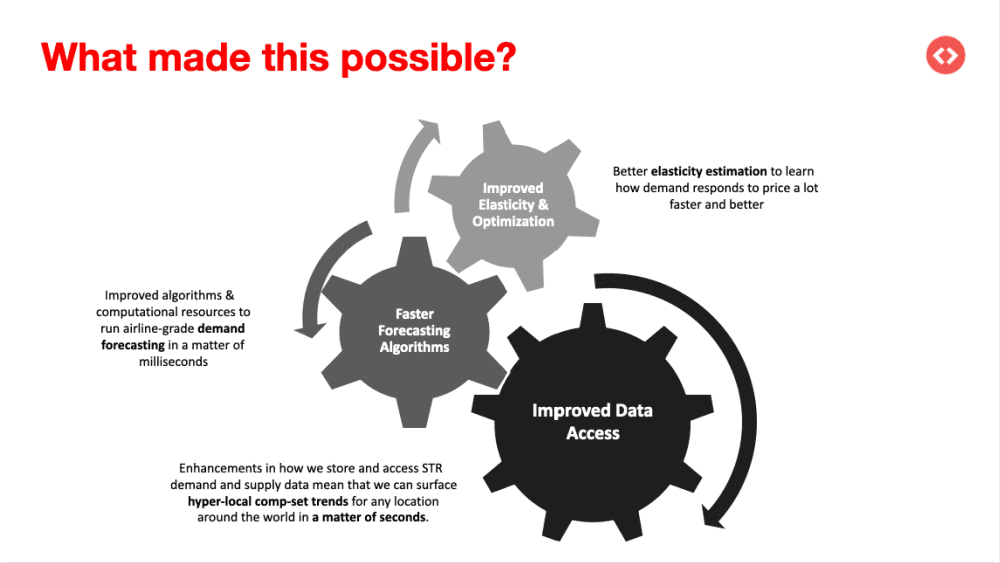
It uses a custom algorithm to analyze pricing trends specific to your exact area. So if a concert or festival suddenly drives up demand on your street (but not across town), your pricing adapts accordingly—without you lifting a finger.
It’s like having a local expert watching your calendar every day, keeping you ahead of demand without any extra work on your part.
Hyper Local Pulse is PriceLabs’ proprietary pricing engine powered by neighborhood-level demand modeling. Unlike tools that rely solely on macro trends, this feature surfaces real-time price recommendations specific to your micro-market—updated daily.
- Event Detection Engine: Captures sudden demand spikes tied to local events
- Booking Velocity Modeling: Adapts prices based on booking pace relative to market
- Localized Pricing Curves: Differentiates pricing strategies by bedroom count, amenities, and geography
With PriceLabs, you’re not just automating pricing—you’re deeply understanding your business. And the best part? It’s made for hosts like you who want real results without spending hours figuring it all out.
How PriceLabs Outperforms Other Airbnb Analyzer Apps
Most Airbnb analyzer tools start with good intentions—but many of them quickly become more work than they’re worth. Either they’re built for enterprise-level managers, packed with features you’ll never use, or they assume you already speak fluent “data science.” That’s where PriceLabs takes a completely different path.

Here’s what sets it apart:
- Built for real-life hosts, not data analysts: You don’t need a background in revenue management to use PriceLabs. It’s designed so you can plug in, set your preferences, and get insights that make sense without decoding graphs or industry jargon.
- No fluff—just what helps you earn more: Instead of trying to impress with 50 different metrics, PriceLabs focuses on what actually moves the needle: smart pricing, occupancy trends, pacing, and demand forecasts tailored to your listings.
- It thinks local—even hyperlocal: Other tools may give you a bird’s-eye view of the market, but PriceLabs drills down to your street, your type of home, your booking window. Hyper Local Pulse doesn’t just show you trends—it adapts to them for you.
- It balances automation with control: You can let PriceLabs handle everything, or fine-tune it to match your style. Want higher weekend rates? Prefer to avoid one-night bookings? It’s your call—PriceLabs just makes it easier to set up and stick to.
- It respects your time and hustle: You already wear all the hats—cleaning, messaging, troubleshooting, and trying to stay competitive. PriceLabs gives you insights that work as hard as you do, without adding to your to-do list.
PriceLabs doesn’t try to be everything for everyone. It’s focused on being the best analyzer for hosts who care about performance but don’t want to spend hours obsessing over it. Simple as that.
Getting Started with PriceLabs
Getting started with PriceLabs is refreshingly simple—no deep setup guides or overwhelming dashboards. If you can connect your listing to Airbnb, you can start analyzing with PriceLabs.
Here’s how it works:
- Connect your listing: Link your Airbnb (or other platform) account with just a few clicks.
- Set your base and minimum prices: PriceLabs will suggest adjustments, but you’re always in control of your floor.
- Explore your analytics: Open up Portfolio Analytics to view everything from average daily rates to pacing insights.
- Customize as you go: Whether it’s last-minute discounts, minimum stay rules, or a custom report, it’s all there—just a few clicks away.
- Watch it work: Prices update daily. Calendar gaps shrink. Your time and revenue stretch further.
And yes, there’s a free 30-day trial, so you can see the impact before you commit. No strings, no pressure—just smarter hosting from day one.
Conclusion
For hosts managing a handful of listings, staying competitive without burning out is a delicate balance. You don’t have time to decode market trends every week or tweak prices daily—and honestly, you shouldn’t have to. That’s exactly where the right Airbnb analyzer steps in.
PriceLabs gives you the insights you need without the overwhelm. It turns your calendar into a strategy, your pricing into a system, and your time back into something you control. Whether you’re just getting started or looking to level up, it’s built to support the way small hosts actually work.
No spreadsheets, no second-guessing—just smart, simple tools that help you grow.
The post What is the Best Airbnb Analyzer for My Vacation Rental Business? appeared first on PriceLabs .
]]>